
Dayforce
Overview
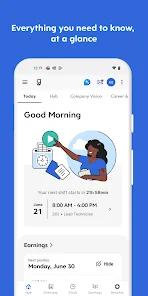
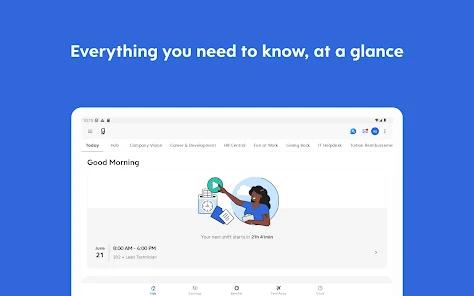
The Dayforce Mobile application acts as the primary mobile portal for organizations utilizing the broader Dayforce platform. Designed to replace fragmented, manual processes, the application consolidates schedule coordination, time-and-attendance tracking, benefit administration, and payroll tasks into a single mobile interface.
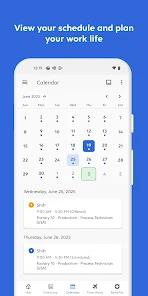
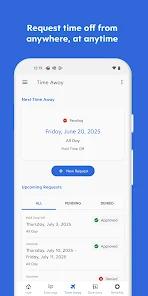
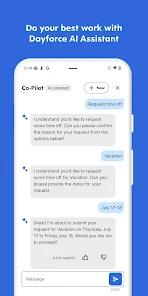
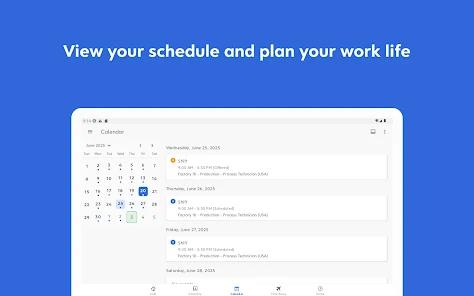
For frontline workers, the interface centers on shift execution and calendar coordination. The shift management system allows employees to view assigned hours, submit shift trade requests, and request paid time off (PTO). These actions are governed by backend business rules, ensuring that shift trades and time-off requests automatically route to managers for review, aligning with organizational labor compliance guidelines.
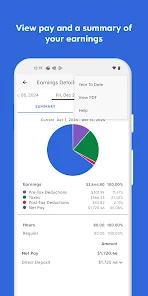
The application allows users to monitor their accrued net earnings throughout the pay cycle. This allows employees to access earned wages prior to the traditional payday, bypassing standard direct-deposit delays. However, this capability is dependent on employer-level configuration, meaning its availability varies depending on corporate enrollment.
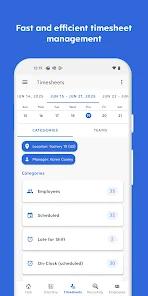
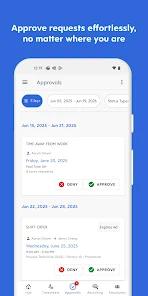
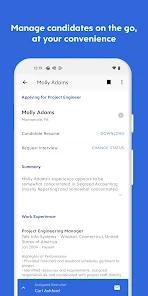
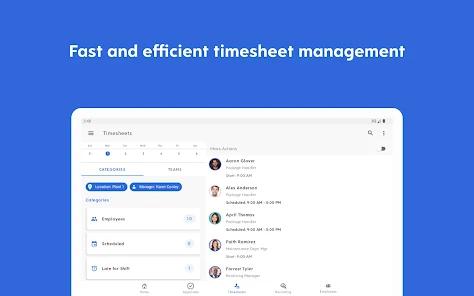
From an administrative perspective, the application provides managers with tools to handle tasks on the go. Leaders can view aggregated timesheets, approve or deny leave requests, and track real-time attendance. This decentralized administrative flow reduces structural bottlenecks, allowing supervisors to resolve staffing anomalies directly from their mobile devices rather than being tethered to a desktop portal. It uses biometrics & secondary 2FA verification to ensure user's security.
Despite its utility, some friction exists within the user experience layer, particularly concerning security enforcement and device compatibility. The application implements a highly restrictive security model, requiring frequent multi-factor authentication (MFA) handshakes that do not reliably retain user credentials.
Additionally, the geofencing algorithms used to verify worker clock-ins occasionally generate spatial coordinates that fail to register within worksite parameters, causing clock-in failures even when employees are physically present. This indicates a discrepancy between security compliance objectives and the practical demands of shift-based work environments.
Pros & Cons
Continuous Earnings Monitoring: Allows employees to track their accrued net earnings in real time throughout the active pay cycle.
On-Demand Wage Access: Direct integration with the Dayforce Wallet lets users access earned income before official paydays.
Decentralized Shift Exchanges: Simplifies shift swaps, coverage requests, and calendar modifications directly between coworkers.
Mobile Manager Toolset: Equips supervisors to approve timesheets, track active attendance, and respond to PTO requests remotely.
Centralized Benefits Overview: Provides mobile access to personal insurance, retirement plans, and benefits declarations.
- ✕
Inconsistent Geofencing Verification: Geofencing mechanisms can produce coordinate mismatches, preventing employees from clocking in.
- ✕
Repetitive Authentication Loops: Inconsistent credential storage forces users to complete redundant multi-factor authentication steps repeatedly.
- ✕
Periodic Application Downtime: In-app service interruptions occasionally prevent users from accessing schedules or logging hours.
- ✕
Incomplete Desktop Parity: Key HR capabilities, such as performance reviews and detailed benefits configurations, often require logging into the desktop portal.
Download
 Get it on Google Play
  Get it on App Store
 FAQs
What is the primary function of the Dayforce Mobile app?
The application is designed to act as a secure, mobile-friendly extension of the Dayforce HCM platform, allowing employees to track schedules, request time off, swap shifts, view benefits, and access on-demand pay.
How does geofencing affect clocking in and out?
The application uses the mobile device's GPS coordinates to verify that the employee is within a pre-determined geographical radius of the workplace. If the coordinates do not match, the application blocks the clock-in attempt.
Why does the application require frequent logins despite biometric settings?
To comply with enterprise security standards, the application requires regular credential validation. This policy often overrides "remember me" prompts, forcing secondary verification loops.
Can all employees use the Dayforce Wallet early-pay features?
No. The availability of on-demand pay through the Dayforce Wallet is entirely dependent on whether the employer has chosen to activate and configure this integration.
What should a user do if they experience an application error code?
Users are advised to clear the application cache, check for updates, or contact their corporate HR department, as configuration parameters are managed at the organizational level.
Hot Reviews
Users report frequent connection drops and server communication errors that prevent them from accessing updated work rosters or logging their hours, which can cause attendance disputes.
A common issue involves geofencing errors, where the application reports that the user is outside the workplace boundaries despite being physically on-site.
Employees express frustration with security policies that require secondary SMS verification immediately after biometric authentication, adding friction to daily clock-ins.