
Meta Business Suite


Overview
Meta Business Suite has undergone a significant architectural evolution from its origin as the Facebook Pages Manager app. This change represents a strategic shift from simple single-platform moderation to unified cross-platform business operations. The application acts as a central administrative console for businesses, content creators, and brand managers seeking to consolidate their digital presence across Meta's primary consumer channels, specifically Facebook and Instagram. By bridging these platforms, the application aims to minimize the operational friction associated with executing marketing campaigns and handling customer service workflows in decentralized environments.
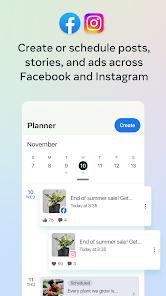
At its core, the application integrates with the Facebook Graph API and the Instagram Content Publishing API. This direct integration allows users to author, format, schedule, and publish media assets directly to both networks from a single drafting screen. This unified publishing system supports a variety of media formats, including standard feed posts, ephemeral stories, and vertical video Reels, while maintaining platform-specific configurations like tags, locations, and hashtags. Content managers can schedule assets using an interactive calendar view, which helps teams coordinate multi-channel publishing strategies without relying on third-party schedulers.
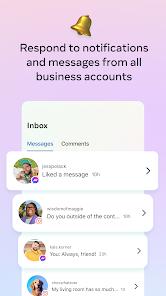
Beyond content distribution, Meta Business Suite features a consolidated messaging inbox. This inbox aggregates direct messages, page comments, and user queries from Facebook Messenger and Instagram into a single thread. To help manage high volumes of customer interactions, the application utilizes automated response workflows. Administrators can configure automated greetings, out-of-office responses, and instant replies to frequently asked questions directly in the mobile environment, saving time and keeping response rates high.
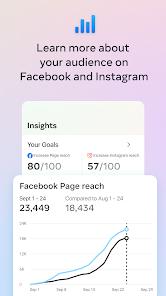
For analytical evaluation, the application contains a native reporting dashboard. This dashboard provides real-time insights into content reach, follower demographics, user engagement trends, and active ad campaign performance. Unlike third-party platforms that must request data through public APIs, Meta Business Suite reads telemetry directly from Meta's servers. This direct access ensures high data accuracy, though it requires broad permissions, including precise device location and financial records for ad spend.
Pros & Cons
Unified Multi-Platform Scheduling: Allows users to design, schedule, and automatically publish posts, stories, and Reels across Facebook and Instagram from one screen.
Consolidated Communication Inbox: Centralizes user comments, Messenger chats, and Instagram direct messages into a single pipeline, helping teams respond faster.
Intelligent Messaging Automation: Empowers organizations to deploy instant, automated replies and out-of-office triggers to handle common inquiries.
Native Analytical Reports: Delivers real-time, detailed statistics on campaign reach, user interactions, and target demographic details.
Multi-Brand Profile Administration: Enables agency administrators to rapidly switch between multiple brand profiles and business pages from a single login.
- ✕
Inadequate Spam Classification: Frequently fails to identify and isolate spam messages or phishing attempts, which can clutter the primary inbox.
- ✕
Background Process Interruptions: Exhibits occasional issues with background processes, leading to delayed notifications or incomplete uploads of larger video files.
- ✕
Intrusive Data Collection: Demands access to precise device location, user contacts, and financial records, presenting potential data security considerations.
- ✕
Layout Scaling Inconsistencies: The dashboard interface can occasionally struggle with scaling and responsiveness when rendering dense analytics on smaller mobile screens.
Download


FAQs
Can a marketer run and track paid ad campaigns within this application?
Yes, the application features an integrated shortcut to manage advertising efforts, allowing users to track campaign reach, monitor budgets, and make adjustments to active campaigns.
How does the multi-page management feature work?
The application allows users to register multiple business profiles under a single Meta account. Administrators can switch between pages using a simple drop-down menu, facilitating rapid workflow transitions.
Can stories be scheduled to post automatically to both networks?
Yes, the scheduler supports planning and automatic publishing for both standard feed posts and stories, publishing them concurrently to Facebook and Instagram.
What are the prerequisites for using the automated response feature?
Automated replies require the page administrator to define trigger terms or schedule specific "away" windows within the inbox settings to activate automated customer support.
Is there an offline drafting mode available in this app?
While the application allows drafting, stable publishing and scheduling actions generally require an active internet connection to authenticate and log data with Meta's servers.
Hot Reviews
The consolidation of Instagram and Facebook messaging feeds is highly effective for customer support. It minimizes application switching, and the analytical trends dashboard provides clear, useful data for adjusting marketing plans.
The overall interface is highly functional, but the spam filter needs improvement. The primary inbox frequently receives promotional spam and phishing messages that the application fails to categorize, which can disrupt daily operations.
The scheduling tools save significant time, but large video uploads can occasionally freeze. In those instances, administrators must switch back to the desktop portal to ensure scheduled posts publish correctly on time.