flowkey: Learn piano

Overview
The mobile application flowkey: Learn piano represents a sophisticated, interactive approach to computer-assisted music education, specifically tailored for piano and keyboard instruction. Operating at the intersection of acoustic signal processing and music pedagogy, flowkey functions as a real-time, responsive digital tutor that supports self-directed learners from introductory stages to advanced play. By combining physical instrument practice with digital feedback loops, the platform addresses the primary challenge of self-guided music education: the absence of immediate error correction.
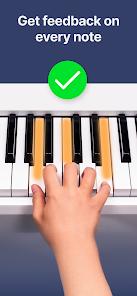
Flowkey’s primary feature is its proprietary polyphonic pitch-detection algorithm. This acoustic note recognition engine captures audio input via the mobile device’s native microphone, processing the sound wave frequencies to identify individual pitches, complex chords, and intervals played on any acoustic piano. For setups where environmental noise might interfere with microphone accuracy, the app supports low-latency MIDI data input. Users can establish connection paths using wired USB-OTG interfaces or wireless Bluetooth MIDI, allowing direct capture of digital instrument keyboard events.
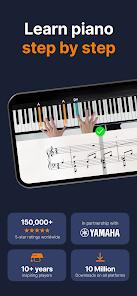
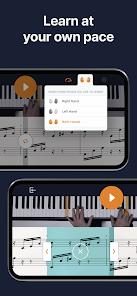
Pedagogically, flowkey offers modular courses alongside an active song library, and uses a split-screen visual interface designed to reduce cognitive load during practice. The upper half displays high-definition video of a professional pianist executing the piece with proper finger positioning, wrist height, and hand posture. The lower half features synchronized digital sheet music scroll indicators. This layout addresses the challenge of translation in sheet music, helping users map abstract visual notation directly to physical finger movements on the keys.
The learning experience is guided by several practice tools:
- Wait Mode: This interactive feature pauses the sheet music and video playback until the user physically executes the correct note or chord. By adapting to the student's speed, it helps prevent the frustration often caused by strict, unyielding play-along tempos.
- Bimanual Practice Isolation: Learning to coordinate both hands is a common hurdle in piano pedagogy. The app addresses this by allowing users to mute either the left or right hand, facilitating focused practice on one hand's part before combining them.
- A-B Segment Looping: To encourage focused, repetitive practice on difficult passages, the app allows users to isolate and loop specific measures or phrases.
- Portrait Sheet Music Layout: When used on larger tablet screens, the interface can adapt to a vertical sheet music view, helping users build traditional reading skills.
Pros & Cons
Multi-Channel Input Versatility: Seamlessly processes acoustic signal tracking through native microphones and direct MIDI data inputs (USB/Bluetooth), ensuring compatibility across acoustic pianos, digital pianos, and electronic keyboards.
Split-Screen Visual Scaffolding: Combines professional video hand-placement demonstrations with synchronized sheet music scrolling, helping users connect symbolic notation to physical hand movement.
Adaptive Wait Mode Integration: Pauses the instructional flow until the user plays the correct note, reducing cognitive overload and allowing self-paced learning.
Precise Bimanual Isolation Practice: Allows users to isolate and practice left- or right-hand parts independently before attempting bimanual synchronization.
Targeted Phrase Looping: Features intuitive A-B looping controls that enable focused practice on difficult passages.
- ✕
Highly Restricted Free Tier: The free experience limits users to a small selection of basic courses and classical songs, requiring a premium subscription for full library access.
- ✕
Abrupt Repertoire Difficulty Spikes: The learning curve can feel steep when transitioning from introductory lessons to full pop or cinematic arrangements.
- ✕
Limited Advanced Technical Material: While the app has a large song catalog, it offers fewer in-depth technical modules for advanced pianists seeking work on complex scales, arpeggios, or micro-level touch mechanics.
- ✕
No Direct Physical Sheet Music Printing: Subscriptions do not include options to print sheet music, keeping users dependent on active device screens.
Download


FAQs
Does the application require an active internet connection to play songs?
A stable internet connection is required to browse the catalog, load interactive video content, and synchronize progress profiles. Some core course configurations may run with cached data, but online access is recommended.
Can I use the platform with a 61-key non-weighted keyboard?
Yes, the application supports keyboards of various sizes, including 61-key and 76-key models. However, some advanced classical and pop arrangements may require a standard 88-key piano to play notes outside of limited ranges.
How do I pair my digital piano using Bluetooth connection protocols?
You can enable Bluetooth on your digital piano, navigate to the app's settings menu, and select the MIDI connection input. The app will pair directly with compatible instruments to capture key velocities and notes with minimal latency.
What are the main differences between the Premium and Classic subscription tiers?
The Premium tier provides full, unlimited access to the entire song library (including pop, rock, and cinematic hits) and all structured course paths. The Classic tier limits access primarily to classical and royalty-free songs.
How does the app handle background environmental noise during practice?
The acoustic detection engine is optimized to isolate the pitch frequencies of a piano, but loud background noises or chatter can occasionally cause recognition errors. For noisy environments, using a direct MIDI connection is recommended.
Hot Reviews
The microphone tracking works surprisingly well even on slightly out-of-tune acoustic uprights. The synchronized video of a pianist's hands is incredibly helpful for learning hand placements and transitions.
The transition from basic lessons to playing full pop songs with both hands can feel sudden. The app would benefit from intermediate steps to help beginners bridge the gap to complex left-hand arpeggios and chords.
While the platform excels as an interactive songbook, the structural music theory courses are brief. Intermediate players may finish the core courses within a couple of weeks, shifting the app's primary value to its song catalog.
The bimanual practice tools and Wait Mode make learning complex classical pieces manageable. Being able to isolate the left hand while slowing down the tempo has halved the time it takes to learn new arrangements.