Gmail
Overview
Gmail is Google's flagship email client and a core component of the Android ecosystem. With mobile devices accounting for an estimated 75% to 84% of all email activity, Gmail for Android has been highly optimized to balance a clean layout with powerful organizational tools. The design of the mobile application focuses on rapid email triage. While desktop email processing often relies on multi-window workflows and complex manual filters, the mobile app is optimized for quick, single-handed navigation. It uses customizable left and right swipe gestures, allowing users to archive, snooze, or delete incoming messages quickly.
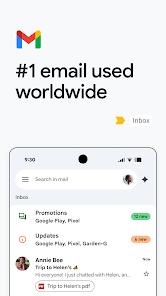
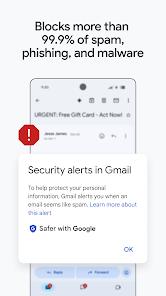
Gmail includes a robust array of security and organization tools. The app uses machine-learning defenses that block over 99.9% of spam, phishing, and malware before they reach the inbox. Incoming emails are automatically sorted into pre-configured categories—such as Primary, Social, and Promotions—to keep the main view clean.
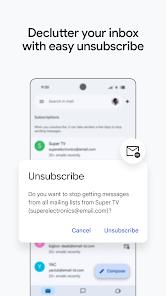
Power-user features include a dedicated "Manage Subscriptions" menu, which aggregates active mailing lists in one place to allow quick unsubscription, and a "Confidential Mode" that lets users set message expiration dates, restrict email forwarding, and require SMS-based security codes.
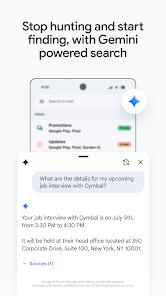
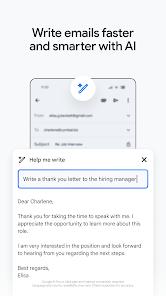
The integration of Google's Gemini AI represents a major modern upgrade. Gemini enables automated email drafting from brief prompts, offers context-aware quick replies, provides bulleted thread summaries, and includes formatting tools to "formalize," "elaborate," or "shorten" drafts.
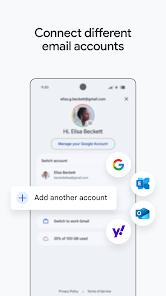
Gmail also functions as a universal email hub, allowing users to manage personal accounts, enterprise Workspace accounts, and external IMAP, POP3, or Exchange servers, switching between them with a quick swipe on the profile picture.
However, this deep integration into the Google ecosystem presents structural trade-offs. Most notably, the free storage tier is shared across Gmail, Google Drive, and Google Photos. As attachments and media accumulate, users can quickly run out of space, leading to persistent warnings to upgrade to paid Google One storage plans.
Additionally, users occasionally report technical issues with the Android client, such as homescreen widgets failing to sync in real-time or layout reflow failures where HTML-heavy emails do not scale correctly to portrait displays.
Pros & Cons
Effective Spam Filtration: Utilizes advanced threat defenses to block over 99.9% of phishing attempts, malware, and spam.
Universal Account Swapping: Allows users to switch between Google Workspace, personal accounts, and external IMAP/Exchange servers easily.
Intuitive Swipe Triage: Features customizable swipe gestures that facilitate quick archiving, deleting, or snoozing of messages.
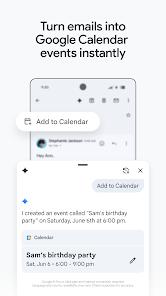
Integrated Collaboration Tools: Embeds Google Chat, Google Meet, and direct Google Calendar invite creation directly within the email client.
Secure Confidential Mode: Protects sensitive communications by allowing users to set expiration dates, restrict forwarding, and require SMS passcodes.
- ✕
Shared Storage Limitations: The free $15\text{ GB}$ storage limit is shared across Gmail, Drive, and Photos, meaning large files in other apps can block email reception.
- ✕
Widget Synchronization Errors: Device homescreen widgets can occasionally fail to refresh, displaying loading errors until the app is force-stopped.
- ✕
Simplified Mobile Text Formatting: The mobile compose interface offers basic formatting options compared to the rich text tools available on the desktop version.
- ✕
HTML Reflow Issues: Large, media-heavy newsletter layouts can occasionally fail to scale down, forcing awkward horizontal scrolling.
Download


FAQs
Can Gmail manage non-Google email accounts?
Yes, the application supports universal integration, allowing users to add and manage accounts from Outlook, Yahoo, iCloud, and custom IMAP servers.
How does Confidential Mode secure outgoing messages?
It prevents recipients from copying, forwarding, downloading, or printing content, and allows senders to set message expiration dates or SMS passcodes.
Why am I out of space when my inbox is mostly empty?
The free 15GB storage tier is shared across Gmail, Google Drive, and Google Photos; files stored in those other apps count against your shared limit.
Can I search my email when offline?
Yes, the app caches recent conversations locally, allowing users to search, read, and write drafts that will send automatically once internet access is restored.
What does the Gemini AI feature do in the compose window?
Gemini is Google's integrated AI assistant, used to write drafts from short prompts, summarize long incoming threads, and quickly adjust text formatting.
Hot Reviews
The search engine is highly efficient, making it easy to find old threads, and the automatic category filters do an excellent job of keeping promotional spam out of the main inbox.
The app is generally stable, but the homescreen widget frequently freezes and requires a complete app restart to show new emails.
Recent updates have introduced formatting bugs where some media-heavy emails fail to fit the width of the phone display, requiring slow horizontal scrolling.