Simply Draw: Learn to Draw
Simply Draw is one of the cleanest beginner-to-draw apps on the market — calm, professionally taught, and genuinely backed by real pencil-and-paper results. The paywall arrives early, right after the free basics, and the follow-along format is built for beginners rather than independent artists, so treat this as a structured starting point, not a substitute for a real art education.
- Complete beginners and children aged 7+ who want calm, step-by-step pencil-and-paper drawing lessons with zero technical setup required
- Parents and families looking for a structured creative activity that produces tangible physical art and builds a real drawing habit
- Anyone well past the beginner stage — the format teaches you to follow guided sequences rather than draw independently, and its more advanced lessons sit behind the steep subscription
- Budget-conscious users or anyone expecting freeform creative tools — the free tier functions as a demo, and the subscription (around £14/month or £80/year) is steep for supplemental guided instruction
Overview
If you’ve ever muttered “I can’t draw” and actually believed it, Simply Draw is built for exactly that feeling of creative inadequacy. The app doesn’t hand you a blank canvas and wish you luck. It positions itself as a patient, structured tutor: video by video, stroke by stroke, it walks you through the exact pencil marks that produce a recognisable nose, a convincing shadow, a likeable animal face. For a real and specific audience, that promise holds. For everyone outside that audience, a stiff paywall and a ceiling on content depth arrive before the skills do.
What Simply Draw actually is
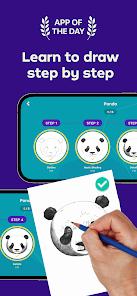
Strip away the description copy and you have a structured video-tutorial curriculum for absolute beginners using nothing but pencil and paper. No stylus required, no drawing tablet, no digital layers. That deliberate simplicity is both the app’s greatest strength and an honest signal of its scope: it teaches foundational drawing mechanics — line work, shading, proportion, perspective — in a carefully sequenced format, rather than offering an open creative environment.
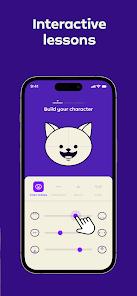
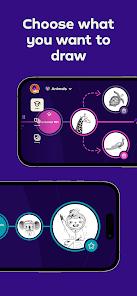
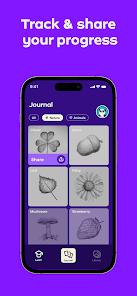
Onboarding starts by asking about your interests: portraiture, nature, characters, objects. The app uses those answers to tailor which subjects your learning path emphasises. The instruction comes from professional art teachers who deliver short, clearly produced video lessons, breaking a finished drawing down into stages you can follow one at a time. Watch the teacher draw a shadow; pause; try it yourself on paper. That rhythm, as unassuming as it sounds, is well-executed.
The lesson experience
The production quality is genuinely strong. Videos are clear, well-lit, and paced for someone who has never approached a blank page with any confidence. The instructor demonstrates each step before asking you to replicate it, which removes the gap between “I can see what to do” and “I know how to start.” Users describe the experience as “calming” and “manageable” with notable consistency across reviews — and those are words you rarely see applied to creative instruction apps, which suggests the pacing hits its intended mark.
The physical-media emphasis is worth dwelling on. In an environment where children already spend significant time on screens, Simply Draw’s insistence that you pick up a real pencil and draw on real paper is a meaningful differentiator. What you produce exists in the world: you can hold it, display it, photograph it. Multiple reviewers specifically contrast this with digital painting apps, noting that their children “actually have something to show” at the end of a session — the drawing on the fridge rather than a pixel file. The app functions as a creative activity alongside the screen rather than another screen activity.
Weekly new content — fresh drawing sessions, creative challenges — keeps the library growing and gives younger learners a reason to return after completing the initial paths. Version 1.6.2, updated April 2026, is consistent with an actively maintained product rather than a forgotten one.
The subscription reality
Here’s where we stop describing and start warning. The free tier of Simply Draw is thin. You get enough introductory tutorials to understand the instruction style, work through one or two short sequences, and confirm that the format suits you. Then the paywall arrives. The full subscription runs approximately £14 per month or £80 per year, according to the app’s own FAQ and consistent user reports at the time of this review.
That is not trivial for a supplemental tutorial app. The monthly tier adds up fast if someone signs up without realising the annual option exists. Parents assessing this for children flag the pricing as the dominant friction point — the pedagogical quality is “widely recognised” in reviews, but many parents find the annual fee a “significant investment compared to other apps.”
What caught us out in the review signals is how deliberately the paywall is timed. You complete the first path, feel genuine momentum, and hit the wall at precisely the moment the app has earned your engagement. That is savvy monetisation and a frustrating user experience at the same time — reviewers describe the transition from free “basics” to the paid “next path” as “too abrupt,” and it is difficult to disagree. The app earns your interest, then asks you to pay to continue before you’ve had enough time to decide whether it deserves to.
One more gap worth naming: the app’s description mentions AI-powered feedback, but in practice the experience is video-led instruction. Community features and some compositional feedback exist, but there is no sophisticated real-time critique of your pencil work. That is not fatal — the video instruction is the actual value — but it is a gap between what is advertised and what you will encounter.
What real users say
Review themes cluster into two clear camps. On the positive side: users who came to the app with zero drawing ability and finished a lesson genuinely surprised by what they produced on paper. “Calming,” “manageable,” and “relaxing” recur in review after review — and they describe an experience that is often the opposite of how creative apps tend to make beginners feel. The weekly challenge mechanic earns particular credit for keeping younger learners engaged well beyond the initial batch of lessons, which is a real differentiator in an app category prone to early abandonment.
On the negative side: the paywall timing and the subscription cost dominate every critical review. The ads appearing in the free tier draw criticism for being “distracting” and “misaligned with the educational tone” — a fair complaint when the app’s core promise is a focused, calm learning environment. An intrusive ad between a shading lesson and your first attempt at replicating it undermines exactly what the app is selling.
One structural limit is worth naming — and it’s our observation rather than a common user complaint. The app teaches you to follow a guided sequence effectively; it does not set out to teach you to observe or think like an artist independently. The curriculum does progress from basic shapes toward more complex drawings, but the more advanced material sits behind the subscription, and the follow-along format has a natural ceiling for anyone who wants to build independent skill. For complete novices — the intended audience — that is entirely appropriate, and it’s the design working as intended.
Who it’s NOT for
Let us be direct. Simply Draw is not the right tool if:
You have any drawing experience past the absolute beginner stage. The format is built around following guided sequences rather than developing independent observation, and its more advanced lessons are gated behind the steep subscription rather than included in the base experience.
You want a freeform creative canvas. There is no blank drawing surface here, no brush library, no layer system. Apps like Autodesk Sketchbook exist for that workflow; Simply Draw is categorically not competing with them and should not be compared as if it were.
You are looking for serious art instruction. YouTube channels like Proko or Ctrl+Paint offer deeper technique coverage — figure drawing, perspective systems, anatomy — at no cost and with more specialist depth. If you are aiming to study drawing seriously and independently, this guided follow-along format isn’t built for that, and the free alternatives go further.
You need value on a tight budget. The free content functions as a demo, not a meaningful tier. If the subscription price gives you pause, that hesitation is worth taking seriously.
How it compares to alternatives
The comparison splits into two separate conversations. For freeform digital drawing, Simply Draw is not in the same category as Sketchbook or similar tools — those are open canvases with full feature sets; this is a structured tutorial curriculum. Comparing them is like comparing a cooking class to a kitchen.
The more direct comparison is to free video instruction. YouTube offers extensive beginner drawing content — from basic shape construction to full portrait walkthroughs — at no cost. What Simply Draw provides over a YouTube search is sequence and structure: someone has ordered the progression, decided what comes before what, and removed the decision fatigue of figuring out where to start. For children especially, that scaffolded approach has genuine value. A structured curriculum is why classroom instruction exists alongside free libraries. The honest question is whether that structure is worth the subscription fee for your specific situation, given that the free alternatives are not thin or low-quality — they are simply unstructured.
The verdict
Simply Draw is a well-produced, honestly targeted tutorial app that delivers on its narrowly stated promise: it teaches absolute beginners, and particularly children, to draw with a pencil. Instruction quality is high, pacing is calm, the physical-media emphasis produces real drawings rather than pixel files, and the weekly update cadence keeps the library from stagnating. Version 1.6.2, updated April 2026, confirms this is a live product with an active developer behind it.
But the paywall is real, the free tier is thin, the subscription pricing is steep for supplemental tutorials, and its more advanced content is gated behind that subscription while the follow-along format is built for beginners rather than independent artists. If you are a complete novice — or buying this for a child who has shown genuine curiosity about drawing — there is a defensible case for the investment: the app will teach something real, and the physical-drawing focus produces something the learner can hold. If you are past the very beginning, want a freeform creative tool, or are hoping to develop serious artistic technique on your own, you will hit that ceiling long before the subscription has justified itself.
How We Evaluate
We evaluate apps using the same checklist regardless of category: what the app actually delivers versus what it promises, where real users hit friction, and who genuinely benefits. For Simply Draw, the central question is whether the structured tutorial format justifies the subscription cost against free alternatives — so we read across Play Store reviews, worked through the developer's stated feature set and pricing, and traced the recurring user-review themes against the app's actual capabilities. We did not conduct a hands-on device session.
Pros & Cons
Highly structured, step-by-step video tutorials created by professional art teachers.
Personalized learning paths tailored to specific artistic interests like nature or characters.
Emphasis on traditional pencil-and-paper drawing, which reduces digital screen-time dependency.
Family-friendly and teacher-recommended, making it a safe environment for young learners.
Regular weekly updates with new drawing sessions and creative challenges.
Flexible learning pace allows users to practice for a few minutes or several hours as needed.
High production quality in videos ensures that techniques like shading are clearly demonstrated.
- ✕
Most advanced content is locked behind a high-priced subscription model.
- ✕
The "free" section is limited to basic introductory tutorials.
- ✕
Some ads have been criticized for being distracting or misaligned with the educational tone.
- ✕
Lacks a robust "free-draw" mode compared to traditional digital painting applications.
Download
 Get it on Google Play
  Get it on App Store
 FAQs
Is Simply Draw suitable for adults?
While designed for beginners aged 7+, the professional techniques like shading are applicable to adult learners as well.
What materials do I need to start?
The app is designed for traditional drawing; you only need a pencil and paper to follow the lessons.
Does the app provide feedback on my work?
Yes, it utilizes AI and community features to offer constructive feedback on composition and line work.
How much does the full version cost?
Users have reported subscription tiers at approximately £14 monthly or £80 annually.
Can I choose what subjects I want to draw?
Yes, the app creates a personalized path based on your stated interests during setup.
Is an offline mode available?
The core tutorials are video-based and typically require a connection, though you can practice on paper anywhere.
Hot Reviews
Users frequently mention that the app makes the daunting task of learning to draw feel manageable and relaxing.
The pedagogical value is widely recognized, but many parents find the annual fee a significant investment compared to other apps.
Unlike digital painting apps, Simply Draw helps users create physical art they can be proud to display on their fridge.
The transition from free "basics" to the paid "next path" is often cited as being too abrupt for casual users.
Regular additions of new challenges ensure that young learners don't lose interest after finishing the initial lessons.