Invoice Maker by Invoice Home

Overview
Developed by Invoice Home Inc. in Austin, Texas, Invoice Maker is designed to reduce the administrative friction of manual bookkeeping. It functions as a lightweight, cloud-synchronized PDF compiler that helps users create professional transactional documents directly from mobile devices.
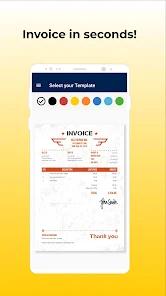
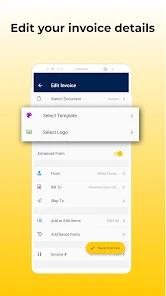
Historically, small business owners had to use complex desktop accounting suites or static document templates that were difficult to edit on mobile. Invoice Home addresses this by consolidating these workflows into a mobile-first framework. The core architecture of the app focuses on professional customization: it offers over 100 templates designed by industry professionals and organized by aesthetic style, a built-in library of 500 pre-designed corporate logos, and support for uploading custom business logos to reinforce brand identity.
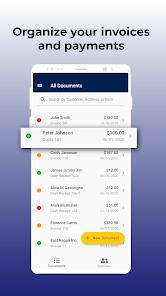
Operationally, the platform supports multiple document forms, allowing users to switch between invoices, PDF estimates, quotes, receipts, proforma invoices, and purchase orders in a single tap. To speed up document creation, the app includes persistent storage for saved inventory items, standard service rates, and client contact details. For international operations, the application supports over 150 unique currency symbols and formats, alongside multi-language PDF compilation.
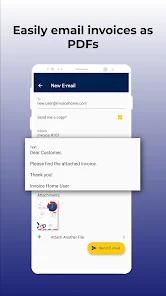
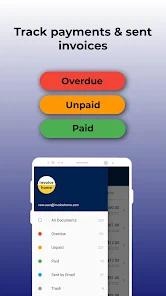
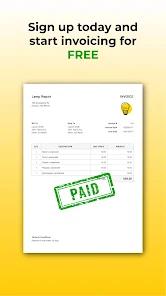
Payment processing is built directly into the generated PDFs. By connecting Stripe or PayPal credentials, users can insert active payment links directly into their invoices, enabling clients to pay instantly via credit card, debit card, or bank transfers. When a transaction is completed, the system automatically records the payment, updates the invoice status, and generates a corresponding receipt.
The application uses a freemium monetization model:
- The Free Plan: Provides full access to all design, customization, and cloud storage features with zero commission markups, but restricts billing to a total of $1,000 (or regional equivalent) per 30-day cycle.
- The Unlimited Plan: Priced at a flat monthly rate (ranging from $6.99 to $9.99 depending on the user's region), this tier removes all billing limitations, making it suitable for growing, high-volume businesses.
Pros & Cons
Diverse Template Library: Offers over 100 professional styles to ensure billing documents align with corporate branding.
Broad Currency and Language Support: Supports over 150 global currencies and multi-language PDF generation.
Direct Payment Integrations: Built-in Stripe and PayPal link processing lets contractors secure credit card payments instantly on job sites.
One-Tap Document Conversion: Converts estimates into invoices or invoices into receipts with a single tap, reducing double-entry work.
Continuous Cloud Backup: Automatically backs up all documents to a secure, unlimited cloud database for instant desktop access.
- ✕
Strict Free Billing Limit: Document generation is immediately blocked once the $1,000 monthly threshold is crossed, which can disrupt active billing.
- ✕
No Advanced CRM Features: Lacks customer relationship pipelines, automated mileage tracking, and integrated bookkeeping ledger systems.
- ✕
Fixed Layout Options: Template designs are structurally rigid, meaning users cannot manually reposition fields or adjust font layouts.
- ✕
Requires Online Connection: Does not support offline PDF compiling, meaning users need an active cellular or Wi-Fi connection to generate invoices.
Download
 Get it on Google Play
  Get it on App Store
 FAQs
What are the limitations of the Free Plan in Invoice Home?
The Free Plan provides full access to all features, including template designs and cloud backups, provided the total sum of all invoices sent remains under $1,000 per 30 days.
How do clients make payments using the invoices sent from the app?
Users can link their Stripe or PayPal merchant accounts to the app. Invoices are compiled with active, secure payment links, enabling clients to pay via credit card, debit card, or online transfer.
Are my invoices and business records automatically backed up?
Yes. Every document created is backed up to the Invoice Home cloud database, ensuring real-time syncing between the mobile app and desktop browsers.
Can I configure custom tax rates and apply discounts?
Yes. The application supports custom, multi-tax configurations (such as VAT or GST) and allows users to apply flat or percentage-based discounts to individual line items or the final invoice subtotal.
Does the application support team-based multi-user access?
The mobile application is optimized for single-user contractor profiles. Multi-user administrative access and team roles are managed through premium corporate settings on the web portal.
Hot Reviews
The design selection is highly impressive compared to standard invoicing software. Being able to change color schemes and upload a clean corporate logo has significantly upgraded our professional presentation.
For startup businesses, the $1,000 free monthly limit is highly helpful. However, keep an eye on your monthly total, as the app will prevent you from sending further invoices mid-month until you upgrade.
This app is highly valued for its speed. It allows contractors to draft an estimate, get verbal approval on-site, convert it into an invoice, and receive payment via PayPal before leaving the job site.