LG ThinQ
Overview
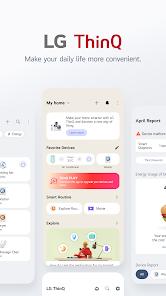
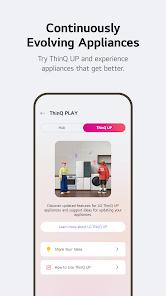
The LG ThinQ application represents a fundamental shift in domestic management, transitioning from simple hardware control to an integrated, AI-driven service ecosystem. As the central hub for LG’s smart appliance portfolio, the application is designed to unify diverse hardware—ranging from washing machines and refrigerators to air purifiers and televisions—under a single, intuitive interface. The core architectural philosophy of ThinQ is predicated on "Smarter Care," a methodology that leverages usage data to provide personalized recommendations for appliance optimization. This is most evident in the "ThinQ UP" feature, which allows appliances to evolve post-purchase via over-the-air (OTA) software updates, introducing new functionalities that align with the user’s changing lifestyle.
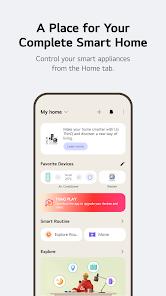
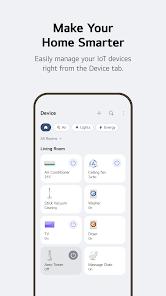
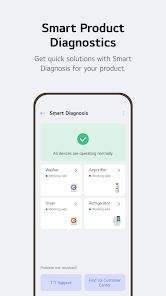
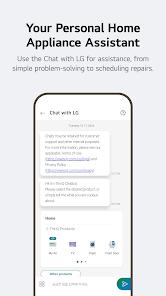
Technically, the application employs a modular functional structure. The "Home" tab serves as the primary dashboard for remote control, allowing users to monitor laundry cycles, adjust refrigerator brightness, or set water dispenser measurements from any location with an internet connection. Beyond basic remote operation, the "Smart Diagnosis" feature utilizes digital or acoustic signatures to verify hardware health, often enabling users to troubleshoot mechanical or software issues without the need for professional technician visits. This diagnostic capability is further enhanced by an AI-powered "Chat with LG" assistant, which provides tailored troubleshooting steps based on the specific model and current condition of the connected device.
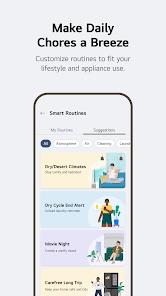
For users seeking high levels of automation, the "Smart Routines" module allows for the creation of complex conditional actions. These routines can be triggered by specific times, locations, or environmental factors—for instance, automatically activating an air purifier upon waking or disabling energy-heavy appliances when the user’s smartphone geofence indicates they are on vacation. Furthermore, the integration with global voice assistants like Amazon Alexa and Google Assistant facilitates hands-free domestic management, allowing users to query the status of their appliances through simple vocal commands. This interoperability is a critical component of LG's strategy to embed its hardware into a broader, platform-agnostic smart home environment.
Pros & Cons
Provides comprehensive remote control for a vast array of LG appliances, ensuring connectivity from any global location with internet access.
The "ThinQ UP" feature ensures that hardware remains current through wireless updates, extending the functional lifecycle of expensive home appliances.
Integrated "Smart Diagnosis" provides an efficient, cost-free method for identifying and resolving appliance malfunctions.
Advanced "Smart Routines" allow for sophisticated home automation based on user-defined triggers such as time, location, or weather.
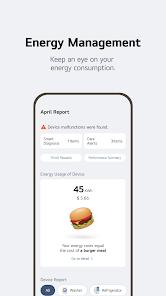
Comprehensive energy monitoring tools help users track power consumption, compare usage with neighbors, and set efficiency goals.
Full integration with Amazon Alexa and Google Assistant allows for intuitive, hands-free operation across the entire smart home ecosystem.
- ✕
Users frequently report significant connectivity issues, with devices occasionally dropping from the app or failing to re-pair after updates.
- ✕
The requirement for extensive system permissions, including location and camera, may present concerns for privacy-conscious users.
- ✕
The "Remote Start" functionality often requires a physical button press on the appliance itself, limiting its utility for truly spontaneous remote operation.
Download


FAQs
How do I initiate the pairing process for a new LG appliance?
Users should select the "+ Add a device" option within the application and follow the guided prompts, which often include scanning a product-specific QR code or connecting via a localized Wi-Fi signal.
What are the minimum system requirements for the ThinQ app?
The application currently requires Android OS 7.0 or higher, or iOS 12.0 or higher, to support the latest feature sets and security protocols.
Can the ThinQ app control non-LG smart home devices?
While optimized for LG products, the application can configure Matter-compatible devices and certain third-party access points through standard IoT protocols.
How does the Energy Monitoring feature work?
The app aggregates consumption data from connected appliances and provides a visual comparison of power usage, helping users identify high-consumption patterns.
Is there a cost associated with the Smart Diagnosis feature?
No, the diagnostic tool is a built-in function of the application and does not require a subscription or additional fees.
Hot Reviews
The application serves as a decent repository for troubleshooting codes and pulling up digital user manuals. The AI-driven routines and reminders for tasks like laundry or oven cleaning significantly simplify household management.
Recent updates have greatly improved the experience for users relying on ScreenOver or VoiceOver. The pairing process has been streamlined to a single button press on many machines, making it much more accessible than previous iterations.
Despite initial success, many users find that the application’s connection to smart TVs and appliances can be unstable. Re-adding devices after they disappear from the dashboard is a common and tedious troubleshooting step.