
Lyft Driver
Overview
The gig economy depends on real-time mobile tools to allocate labor and process micro-payments. For Lyft, the driver-side application serves as the primary gateway for drivers to manage schedules, view trip earnings, navigate routes, and process payments. Structurally, the application balances real-time location mapping with high-speed financial processing, allowing independent contractors to customize their working hours.
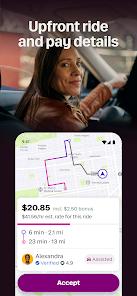
A central feature of the platform is "Upfront Pay". This model calculates and displays the fare amount, pickup location, and drop-off destination before the driver accepts the ride. While this improves transparency, regulatory requirements in cities like Seattle, Portland, and New York restrict its use, forcing the app to fall back on traditional per-minute and per-mile fare structures in those markets.
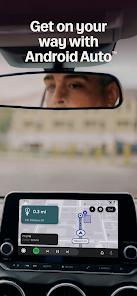
Another important feature is the app's integration with in-car systems via Android Auto, which displays navigation, trip information, and media controls directly on vehicle screens to keep drivers focused on the road.
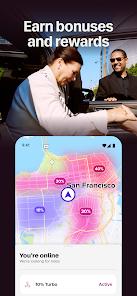
While the application provides useful features, recent changes to routing and passenger allocation have introduced some operational friction. Specifically, drivers report routing errors and inefficient paths after Lyft made its proprietary navigation engine mandatory. Additionally, the interactive matching system—which requires drivers to manually request trips and wait for approval—has led to complaints regarding increased idle times. And it has high battery and data usage. Despite these challenges, the platform remains a major source of income for gig workers across North America.
Pros & Cons
Upfront Fare Transparency: Displays precise pay rates and route directions before a driver accepts a passenger.
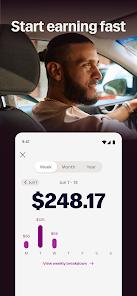
Flexible Payout Options: Allows drivers to transfer their earnings instantly, daily, or weekly.
Integrated Android Auto Support: Displays navigation maps, passenger profiles, and media players directly on in-vehicle dashboard screens.
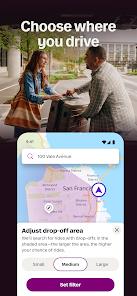
Custom Location Filters: Lets drivers restrict passenger pickups to specific geographical zones to keep routes closer to home.
100% Tip Retention: Guarantees that drivers receive 100% of tips provided by passenger accounts.
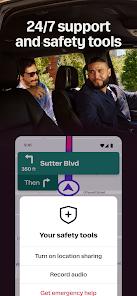
Round-the-Clock Safety and Assistance: Provides access to real-time safety monitoring and support.
- ✕
Inflexible Navigation Requirements: Restricts drivers to the proprietary Lyft navigation system, which can occasionally suggest inefficient or incorrect routes.
- ✕
Inefficient Ride Matching: The interactive matching system often increases idle times and dispatch delays compared to direct proximity-based routing.
- ✕
Low Long-Distance Compensation: Long-haul trip pay sometimes fails to cover high fuel and operational expenses.
- ✕
Heavy Battery and Data Demands: Continuous real-time GPS tracking and map rendering significantly increase battery consumption and mobile data usage.
Download


FAQs
How does "Upfront Pay" calculate driver compensation?
The fare is calculated based on traffic patterns, estimated travel times, and distance before the ride begins. If upfront pay is unavailable in a specific market, compensation reverts to traditional per-minute and per-mile rates.
What are the requirements for using Android Auto with the driver app?
Drivers need an Android smartphone running Android 8 or higher, an active data connection, and the Android Auto application installed on their device.
How quickly can drivers access their earned funds?
Drivers can access earnings through the standard weekly payout schedule or use premium instant payout options to transfer funds directly to their debit cards.
Can drivers use Google Maps or Waze during trips?
While third-party navigation apps can be run on mobile devices, Lyft increasingly encourages or requires drivers to use its proprietary, in-app navigation system.
How do location filters help drivers manage their workday?
Location filters let drivers set specific geographical boundaries, ensuring they only receive pickup requests within their preferred areas.
Hot Reviews
The integration of Android Auto has significantly improved daily operations. Having directions and trip details displayed on the dashboard screen helps drivers stay focused on the road.
The mandatory in-app navigation occasionally suggests inefficient detours or illegal turns. Allowing drivers to switch back to external navigation apps like Google Maps would be a welcome improvement.
The manual ride matching system can increase vehicle idle times. Proximity-based dispatching is generally faster and more efficient for managing trips.
Continuous real-time GPS tracking and map rendering significantly drain device batteries and consume large amounts of mobile data, requiring dedicated in-car chargers.