
Live Anime Shimeji Pets
A genuinely charming way to keep a favorite anime or game character walking around on top of your other apps, with a community-made library that no polished competitor can match. Just know going in that most characters are locked behind a rewarded video every session, menu ads are frequent unless you subscribe, and it leans on the Accessibility permission to draw its overlays.
- Anime, manga, and gaming fans who want to personalize their phone with a beloved character 'living' on their screen — the huge community-made roster is the main draw
- People who like the 'companion effect' of a small mascot hanging out during dull tasks and don't mind watching a short ad to unlock a pet, or paying once to remove the ads
- Anyone uncomfortable granting the Android Accessibility permission, or who wants a distraction-free, uncluttered screen
- Users with a low tolerance for ads who won't buy premium, and people on devices where the reported layout or landscape-calibration bugs bite
Overview
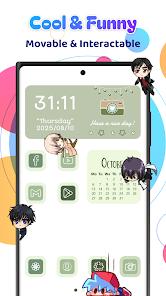
There is something quietly delightful about looking down at your phone mid-scroll and finding a tiny Luffy scaling the edge of your browser, or an Among Us crewmate ambling across your keyboard. That is the whole pitch of Live Anime Shimeji Pets, and for the right person it lands. This is a personalization app that drops small animated characters — “Shimejis,” in the desktop-pet tradition — on top of everything else you have open, so your screen feels a little more alive during dull tasks. We think the core idea is genuinely charming and the community-made character library is a real edge. But the experience comes with honest strings attached: most characters are gated behind a rewarded video every session, the menus show frequent ads unless you pay, and the overlays are drawn using Android’s Accessibility permission. None of that is disqualifying, but all of it is worth understanding before you install.
What it actually is
Strip away the framing and this is a Shimeji overlay app for Android. Shimejis are “desktop pets” — small interactive mascots, an idea that goes back to PC desktops, now transplanted onto the phone. Once active, a character walks, climbs, and crawls over whatever app you are using, floating above most full-screen apps and even games. The store leans on what it calls the “companion effect”: the notion that a favorite character on-screen during mundane moments reduces a bit of digital fatigue. That is a soft, subjective claim, but also an honest description of the appeal — this is decoration and company, not a tool that does anything productive.
The developer is Hydra Global Ltd., and the app sits in Google Play’s Personalization category, carrying a 4.7 rating across roughly 22,943 ratings with 1M+ installs and 6 screenshots on the listing. (The store description elsewhere cites much larger, different figures; we are going with the store’s own authoritative rating and install counts.)
The character library is the real draw
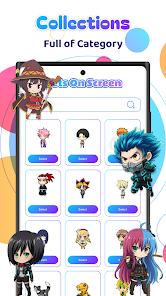
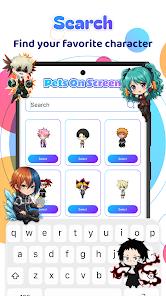
The single strongest thing here is variety. The library runs to hundreds of characters, much of it community-made — fans creating and contributing mascots inspired by manga, games, and broader pop culture. The listing points to inspirations like One Piece and Naruto on the anime side and Among Us and Undertale on the gaming side, as examples of the range rather than an exhaustive catalog. Worth being precise about: these are fan- and community-created interpretations inspired by those franchises, not an assertion of official licensing, and you should read them that way.
That community-driven model is exactly what gives the app its niche appeal. A more polished, tightly curated competitor can offer a cleaner experience, but it will almost never match this breadth, because the variety comes from the crowd rather than a small in-house art team.
Living with your pets
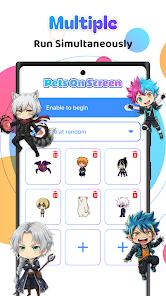
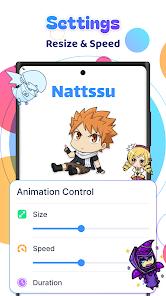
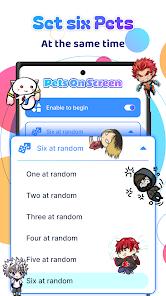
In practice, you can run up to six characters at once, and each is individually adjustable — you can tune its size and movement speed to taste, so a single large slow companion and a swarm of small quick ones are both possible. Interactivity is a real part of the charm: the pets react to touch, and you can drag them, drop them, and “toss” them around the screen, each with its own animations. The listing also makes a “battery-friendly” claim relative to other floating-layer apps, though it sensibly notes in the FAQ that six active pets naturally use more power than a static wallpaper. Treat the battery claim as a relative one, not a promise of zero cost.
The flip side of overlays that sit on top of everything is that, occasionally, one sits on the wrong thing. Users report pets parking over a button and getting in the way of typing or a precise tap — an inherent tension in the format, since the pet is meant to be in your space, but a genuine if intermittent friction point.
The permission, explained plainly
The part that deserves the clearest explanation is how the app draws its characters. It uses Android’s Accessibility Service API to render the overlays on top of the system interface. That sounds heavier than what it is being used for here, so it is worth being straight about both sides. Accessibility Service is a powerful API — the reason many users are cautious about granting it — and you should be thoughtful before enabling it for any app. At the same time, the developer explicitly states this permission is used only to draw the visual overlays, and that the app does not monitor your input or collect sensitive data through it. We cannot independently audit that, and we are not claiming to. What we can do is lay out the trade honestly: the app needs Accessibility to put characters over other apps, the developer’s stated limitation is that it is for visuals only, and whether that exchange is acceptable is a personal call. If granting Accessibility to a decorative app is a line you do not want to cross, that is a completely reasonable place to stop.
The monetization reality
Free to download, this app runs on a “try-before-you-buy” ads model, and the practical shape of that matters. Most characters are locked behind mandatory rewarded video ads: to use a given pet for a session, you watch a short video to unlock it. On top of that, non-premium users see frequent in-menu ads while browsing and setting things up. A premium subscription removes the ads. That is the honest core of the deal — the app is free, but access to its best asset, the character variety, is metered by ad-watching unless you pay to lift the gate.
This is also the loudest theme in critical reviews. The kawaii charm wins fans, but ad density frustrates a meaningful share of users, some of whom say they uninstalled quickly over it. If you have little patience for rewarded-video gating and won’t subscribe, that friction is likely to define your experience.
Where the rough edges are
Beyond ads, there are concrete stability and layout issues to go in aware of. Users report layout bugs where pets vanish or get stuck in a screen corner on some devices, and crashes when downloading new character packs. Landscape mode is a specific weak spot: a recurring complaint is that calibration is off in horizontal orientation, with pets “running around the middle” of the screen instead of tracking the edges as intended. These appear to be device- and orientation-dependent rather than universal, but common enough in the feedback to name plainly. If you spend a lot of time in landscape — gaming or watching video — the calibration issue in particular may undercut the effect.
How it compares
In the desktop-pet and Shimeji niche, the competitive picture is a trade-off between polish and breadth. There are more tightly built, more stable overlay apps out there, but they tend to be narrower — a smaller, curated set of characters and effects. This app’s edge is the opposite: a sprawling, community-made roster that keeps growing because fans keep making characters. If your priority is a rock-solid, bug-free floating companion with a handful of well-behaved options, a more focused competitor may serve you better. If your priority is finding the specific character you love, the sheer variety here is hard to beat, and that is the reason to choose it.
A word on recency
We will be straight about this: the Play Store material carries no listed “updated” date, so we will not invent one. What we can point to is scale and reception — 1M+ installs and a 4.7 rating across roughly 22,943 ratings. A rating that high across more than twenty thousand votes is a meaningful signal that a lot of people enjoy what it does, even accounting for the recurring ad and calibration complaints.
Our take
Live Anime Shimeji Pets does its central idea well: it turns your screen into a little home for a character you love, with a community-made library broad enough that you can probably find exactly the one you want. That variety, the six-pet flexibility, the size and speed controls, and the drag-and-toss interactions add up to a genuinely charming personalization app. The caveats are real and worth stating clearly: most characters require watching a rewarded video each session, menu ads are frequent unless you subscribe to premium, the overlays depend on the Accessibility permission (used, per the developer, only for visuals), pets can occasionally block a tap, and some users hit layout bugs or off-kilter landscape calibration. If you are uncomfortable granting Accessibility, want an uncluttered screen, or have a low tolerance for ads and won’t pay to remove them, this is not the app for you. But if you are an anime or gaming fan who wants a favorite character keeping you company on-screen — and you are fine watching a short ad or paying once to skip them — this is a distinctive, likeable pick that its more polished but narrower rivals can’t quite replicate.
How We Evaluate
We assess every app on the same checklist: what it actually delivers versus what it promises, how honest the pitch is, where real users hit friction, and who should look elsewhere. We did not conduct hands-on device testing of this app. This review is grounded in its own Google Play listing and description, its stated features (the Shimeji overlay system, up to six simultaneous pets, per-pet size and speed controls, touch reactions, the Accessibility-based overlay method and the developer's stated limitation on it), the developer FAQ, its store signals (a 4.7 rating across roughly 22,943 ratings and 1M+ installs, 6 screenshots, developer Hydra Global Ltd.), the recurring themes in published user reviews, and the app's public reputation in the desktop-pet / Shimeji personalization niche. Where we cite user sentiment, we are reflecting documented recurring feedback in the store material rather than personal sessions, and we do not attach star ratings to it.
Pros & Cons
Characters remain visible and interactive while using other apps, providing a constant sense of companionship.
Features a massive library of hundreds of anime and gaming characters created by a dedicated community.
High level of interactivity; pets react differently to being tapped, dragged, or "tossed".
Allows for the display of up to six characters at once, each with adjustable size and movement speed.
Optimized to be "battery-friendly" compared to other floating-layer personalization apps.
The developer is transparent about the use of Accessibility Service permissions.
The application is free to download and offers a "try-before-you-buy" model via ads.
- ✕
Most characters are locked behind mandatory video advertisements.
- ✕
Frequent advertisements within the app menu can be frustrating for non-premium users.
- ✕
May occasionally interfere with typing or precise clicking if a pet is positioned over a critical button.
- ✕
Some reports of "layout bugs" where pets vanish or get stuck in screen corners on certain devices.
Download
 Get it on Google Play
  Get it on App Store
 FAQs
What is a Shimeji?
It is a "desktop pet" or mascot that moves around your screen while you use your device.
Does it collect my data?
The app states it does not monitor user input or collect sensitive data using its accessibility permissions.
How do I unlock new pets?
You can watch a short advertisement to unlock individual characters or subscribe to the premium version.
Can I change the pet's size?
Yes, the app allows you to customize the size and speed of each active Shimeji in the settings.
Will it drain my battery?
While optimized, having six active animated characters will use more power than a standard wallpaper.
Can I use it during games?
Yes, the pets are designed to float over most full-screen applications and games.
Hot Reviews
Fans of anime often describe the app as "perfect" for customizing their phones with their favorite characters.
A frequent point of criticism is the density of ads, with some users stating they "uninstalled after 10 minutes" due to being overwhelmed by commercials.
Some reviews highlight that the pets don't always interact correctly with horizontal screen modes, sometimes "running around the middle" instead of the edges.