
TeamSpeak 3 - Voice Chat
Overview
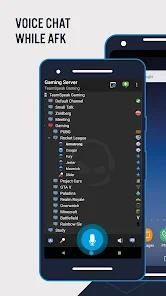
The Android deployment of TeamSpeak 3, represents the mobile adaptation of the classic client-server voice-over-IP (VoIP) architecture designed for low-latency communications. Unlike contemporary communication systems that channel voice streams through centralized corporate cloud infrastructures, TeamSpeak 3 maintains a decentralized client-server topology. In this model, the client does not establish peer-to-peer tunnels or connect to a single monolithic back-end. Instead, it interfaces directly with discrete server instances hosted either by individual users, gaming clans, or commercial hosting providers. This decentralized structural design ensures that the host retains absolute control over their communication infrastructure, voice data storage, and server connection logs, neutralizing risks associated with telemetry harvest and profiling.
The application's core design relies on optimizing real-time audio transmission while keeping device resource utilization as low as possible. By employing the Opus codec as its default engine, TeamSpeak 3 dynamically scales audio quality and bandwidth utilization to match changing network conditions. The application incorporates advanced digital signal processing (DSP) features natively on mobile architectures, including automatic microphone volume adjustment, real-time background noise reduction, and acoustic echo cancellation. These features ensure consistent voice clarity even over unstable cellular connections.
Furthermore, the client integrates positional 3D surround sound capabilities. This feature maps participant channels onto a virtual 360-degree acoustic space, providing critical directional cues that are highly valued in competitive multiplayer gaming and military-style simulated drills.
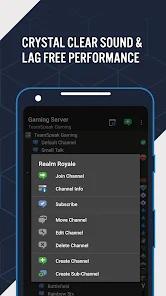
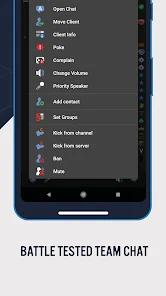
The administrative engine of TeamSpeak 3 is built on a multi-tiered hierarchical permission system. Administrators can enforce strict privilege requirements, determining which clients can join specific rooms, broadcast whispers across channels, or perform administrative tasks like moving, kicking, or banning participants. On mobile devices, this extensive administration is managed through "myTeamSpeak," a secure synchronization system that allows users to export and import cryptographic client identities, server bookmarks, and custom configurations across Android, iOS, Windows, macOS, and Linux platforms.
Operating behind a symbolic $0.99 upfront paywall on the Google Play Store, this model functions as an intentional barrier to entry, keeping the user base highly focused on professional gaming and administrative utilities while discouraging toxic, low-intent actors.
Pros & Cons
Absolute Infrastructure Sovereignty: By utilizing self-hosted servers, organizations and gaming clans retain complete ownership of their data streams, preventing third-party profiling or unauthorized telemetry collection.
Advanced Real-Time DSP Utilities: Natively integrated echo cancellation, background noise reduction, and auto-gain leveling ensure high audio quality even on low-end mobile devices.
Granular Privilege Management: The extensive administrative permission system allows operators to manage access rights down to individual channel levels, preventing unauthorized interruptions or channel-hopping.
Positional 3D Surround Sound: The 360-degree directional audio mapping provides immersive acoustic feedback, offering a distinct advantage in competitive multiplayer environments.
Cryptographic Identity Portability: The myTeamSpeak synchronization engine allows users to safely transition bookmarks, identities, and server access tokens across mobile and desktop devices.
Optimized Hardware Resource Footprint: The application consumes minimal background RAM and CPU cycles, preserving battery life and device performance during resource-heavy gaming sessions.
- ✕
High Technical Setup Complexity: The application requires users to understand server IP addresses, ports, and token-based privilege keys, presenting a steep learning curve for non-technical individuals.
- ✕
Outdated User Interface Design: The mobile application’s layout is visually dated, lacking the modern design, gestures, and quick-access configurations found in newer communication apps.
- ✕
Two-Factor Authentication Compatibility Issues: The mobile login process often struggles with active two-factor authentication (2FA), leading to login errors and timeouts for secured accounts.
- ✕
No Support for Video or Screen Sharing: The client is restricted strictly to voice and text data, rendering it insufficient for teams requiring visual collaboration.
Download


FAQs
Does the TeamSpeak 3 Android client require a subscription?
No, the client requires a one-time purchase fee of $0.99 on the Google Play Store, with no recurring subscription plans or native advertisements.
Can a user host a TeamSpeak server directly on an Android device?
No, the Android client is strictly a voice receiver and console. The server software must be hosted on an external PC, dedicated server, or commercial VPS.
What is the myTeamSpeak synchronization utility?
It is a cloud-based sync system that securely stores bookmarks, unique cryptographic user identities, whisper lists, and custom layouts to sync them across multiple active devices.
How does TeamSpeak 3 ensure voice security?
The platform supports optional, robust AES-based encryption for the entire server or specific channels, which can be enabled by server administrators to protect against packet sniffing.
Does the Android client support Push-To-Talk and Voice Activation?
Yes, both transmission modes are natively supported, allowing users to configure custom mic sensitivity levels or map physical buttons for voice transmission.
Hot Reviews
Users report that the application’s authentication engine frequently fails to process 2FA tokens correctly on Android, forcing them to temporarily disable security settings on their PC to log in on their phones.
Reviewers praise the app's robust performance, noting that the audio stream remains clear and stable even when transitioning between Wi-Fi and weak LTE signals.
Users express frustration with the menu layout, explaining that simple actions like sending direct messages or copy-pasting links require navigating through multiple full-screen menus.
Long-time users note that while major updates can occasionally introduce bugs with voice activation or connections, the developers are quick to release patches to restore stability.