
Video Downloader - VDownloader
Overview
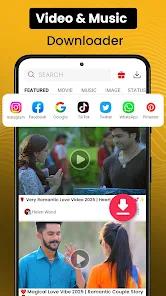
Video Downloader - VDownloader, developed by Markhoor Studio, operates within the Android ecosystem as an intermediary file extraction tool. Designed to retrieve and locally preserve remote media assets, the application addresses the challenge of accessing high-definition video files, social media clips, and audio tracks when offline. Its technical framework relies on an automated parsing engine that identifies and extracts direct streaming media links from web pages, bypassing the need for manual code inspection.
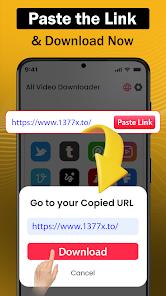
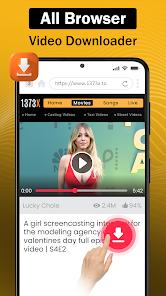
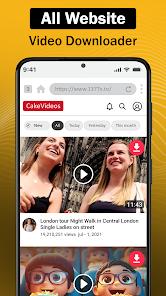
Users can manually paste copied URLs into the primary interface, or use the built-in browser engine. This web client utilizes a customized WebKit view that monitors ongoing network requests and HTTP headers in the background. When a compatible video or audio format (such as .mp4, .avi, .mov, .wmv, or .mp3) is loaded, the monitoring service intercepts the source stream URL and presents a floating download button. This allows the user to initiate the download process with a single tap, bypassing standard web interfaces and nested scripts.
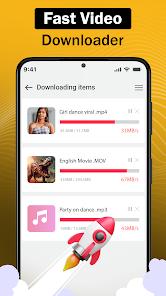
To optimize file transfer speeds, the application's download engine uses multi-threaded TCP connections. Instead of downloading a file as a single stream—which can easily trigger rate-limiting policies on hosting servers—the engine divides the target file into multiple segments and downloads them concurrently. This segmentation helps maximize available network bandwidth. Additionally, the background execution service uses system wakelocks to keep download threads active even when the device enters low-power sleep states.
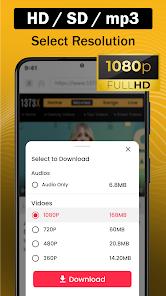
This application supports varying resolutions on compatible hosting platforms, offering options up to Full HD on networks like Dailymotion. However, on platforms with highly restricted access controls, such as TikTok or Instagram, the application is limited to extracting fixed resolutions based on the active mobile web view.
The application also faces structural challenges common to utility tools hosted on the Google Play Store. To comply with platform policies, the application restricts direct media downloads from YouTube, returning connection or timeout errors when such links are processed. In terms of data security, the developer's privacy declaration reveals that the app may share user activity, browsing history, and performance telemetry with third-party advertising networks, which is a standard trade-off in ad-supported utility programs.
Pros & Cons
Multi-Threaded Segmentation: Speeds up file transfers by splitting assets into multiple download segments.
Automated Web Interception: Dynamically identifies media URLs in web pages to provide a single-tap download overlay.
Broad File Type Support: Compatible with multiple media formats, including MP4, AVI, MOV, WMV, and MP3.
Background Process Execution: Keeps downloads active using background services when the application is minimized.
Built-in Media Verification: Features an integrated media player for quick offline playback of downloaded files.
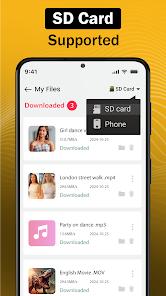
Direct File Allocation Management: Allows users to create directories, rename files, and organize downloads.
- ✕
YouTube Policy Restrictions: Programmatically blocks media extraction from YouTube to comply with Google Play Store policies.
- ✕
In-App Advertisement Interruptions: The ad-supported model features frequent full-screen ads that interrupt standard workflows.
- ✕
Data Sharing Telemetry: Shares web browsing metadata and usage statistics with external networks.
- ✕
File Storage Indexing Errors: Occasionally fails to register downloaded files with the system's gallery database, requiring manual folder refreshes.
Download
 Get it on Google Play
  Get it on App Store
 FAQs
Is the application capable of downloading video files from YouTube?
No. Due to Google Play Store terms of service and intellectual property guidelines, downloading content from YouTube is programmatically restricted.
How does the background download engine operate when the screen is off?
The engine uses system background tasks and wake locks to maintain network connections and finish active file downloads even when the device is locked.
Is there a file size limit for downloading high-definition videos?
No. The application does not place software limits on file sizes, though the overall download capacity remains constrained by available local storage on the device.
How can a user select a specific video resolution before downloading?
For compatible platforms like Dailymotion, the interface displays a menu with available quality options up to Full HD; other platforms default to their native mobile resolution.
Where are the downloaded media files located on the device storage?
Files are saved to designated directories within the device's local storage and can be accessed via the app's manager or any standard file utility.
Hot Reviews
The application delivers fast downloads on standard social media links. The multi-threaded download engine optimizes bandwidth and handles large files reliably.
Attempts to download content from YouTube consistently fail or trigger error messages due to platform-enforced policy restrictions.
Some downloads complete successfully but do not appear in external gallery apps because the media is not indexed correctly in the device storage.