Paychex Flex
Overview
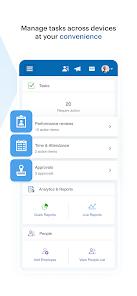
Paychex Flex is the mobile human capital management (HCM) gateway developed by Paychex, Inc. to extend payroll, human resources, time tracking, and employee benefits services to mobile devices. The application is designed to keep employees and employers connected to their organization's payroll systems and HR resources.
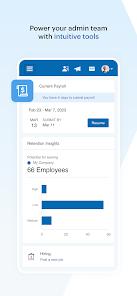
The functional architecture of Paychex Flex is divided into two distinct profiles. For employers and HR managers, the application provides a mobile payroll administration portal. Managers can review cash requirements, compile hours, and submit pending payrolls directly from the mobile app, with the ability to resume payroll runs started on desktop browsers. It also provides managers with access to employee compensation data, current tax withholding forms, benefits carrier details, and retirement plan metrics.
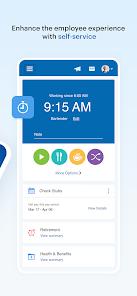
For employees, the application acts as a self-service human resources hub. Employees can access current and historical paychecks, download annual W-2 statements, update direct deposit records, track their flexible spending accounts (FSA), and adjust their health insurance enrollment options. Additionally, the app includes a dedicated retirement portal where users can trace their 401(k) balances, monitor rate-of-return trends, adjust contribution percentages, and manage outstanding retirement plan loans.
However, some users report friction when using the self-service features, particularly regarding authentication security. While the app supports biometric Touch ID and Face ID, its security settings can cause frequent logouts. This often prompts users to complete repetitive SMS-based multi-factor authentication steps, even on devices marked as trusted. For employees who use the app to log their working hours, navigating through nested menus to access daily clock-in and clock-out buttons can slow down the process and lead to time-logging errors.
Pros & Cons
Comprehensive HR and Payroll Integration: Unifies payroll processing, benefits tracking, and HR reporting into a single mobile dashboard.
In-Depth Employee Self-Service: Allows employees to quickly access historical pay stubs, annual tax documents, and W-2 statements.
Integrated Retirement Management: Enables users to directly track 401(k) balances, monitor returns, and adjust their retirement contributions.
Robust Benefits and FSA Tracking: Streamlines employee health benefits administration and tracks Flexible Spending Account (FSA) balances and claims.
Biometric Login Security: Protects sensitive financial data by supporting secure fingerprint and facial recognition logins.
- ✕
Repetitive MFA Prompts: Frequently logs users out and requires text-message verification codes, even on devices marked as trusted.
- ✕
Inefficient Clock-In Interface: The daily clock-in and clock-out options are located under nested menus, which can slow down daily time tracking.
- ✕
Frequent Session Timeouts: Users can encounter unexpected connection errors or timeout messages during peak payroll processing windows.
- ✕
Limited Direct Shift Coverage: Lacks an active team schedule matrix, making it difficult for colleagues to coordinate shift swaps directly in the app.
Download


FAQs
Can an employee update direct deposit information within Paychex Flex?
Yes, employees can adjust their direct deposit accounts and update personal tax withholdings directly through the self-service portal, subject to company policy.
How does an administrator submit payroll runs using the app?
Administrators can access the employer portal, input employee hours, verify cash requirements, and submit payroll directly from their mobile device.
Does Paychex Flex support biometric logins?
Yes, the app supports standard biometric options, including Touch ID and Face ID, to secure sensitive financial and personal data.
Can employees track their health insurance and FSA claims in the app?
Yes, employees can view active health benefits, check Flexible Spending Account (FSA) balances, and monitor claim reimbursement activity.
Why does the application frequently require verification codes?
This is a security measure to protect sensitive financial and personal data. If session tokens expire or device cookies are cleared, the system will prompt for SMS verification.
Hot Reviews
Having direct access to pay stubs, health insurance cards, and 401(k) portfolios in a single secure application is highly convenient. It makes managing personal HR records much simpler.
The multi-factor authentication system is overly repetitive. The application frequently ignores the "remember this device" selection, requiring a texted code almost every time the app is opened, which is inconvenient for daily clock-ins.
The timecard interface needs improvement. Navigating through multiple nested menus to clock out at the end of a shift is frustrating and can easily lead to incorrect time logs.