
AI Remodel - Interior Design





Overview
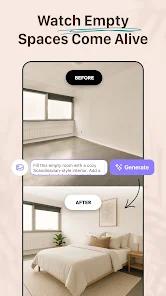
The intersection of generative artificial intelligence and interior design has created a new category of home improvement tools that prioritize visualization over technical documentation. AI Remodel represents a significant shift in how homeowners and professionals approach the concept phase of renovation. Traditionally, interior design required the use of complex Computer-Aided Design (CAD) software or manual mood boards, both of which presented high barriers to entry for casual users. AI Remodel addresses this by utilizing sophisticated image-to-image diffusion models to interpret the geometric constraints of a physical space from a single photograph.
The core mechanism of the application involves a deep neural network that identifies structural boundaries such as walls, windows, and load-bearing columns. Once these parameters are established, the AI can overlay various aesthetic "skins" that alter textures, lighting, and furniture placement without compromising the physical reality of the room. This feature, often described as "Style Exploration," allows users to toggle between diverse design philosophies including Scandinavian minimalism, Mid-century modern, and Bohemian chic. Unlike simple augmented reality filters, this tool generates context-aware lighting and shadows, ensuring that a virtual oak table placed in a sunlit corner appears physically grounded in the generated render.
An in-depth comparison with professional-grade tools reveals that AI Remodel serves a specific niche: the "imagination gap" phase of a project. While professional software focuses on precise measurements and inventory-specific furniture models, AI Remodel prioritizes high-speed ideation. It is particularly effective for "broad strokes" planning, allowing a user to see if a kitchen would benefit from dark cabinetry or an open-concept layout before committing to a physical demolition. Furthermore, the app integrates with 3D planning sandboxes where users can manually rotate and scale objects, providing a hybrid experience that combines AI automation with human agency. Insightful observations suggest that the app's ad-free environment—at least within the paid tiers—points to a strategic positioning towards serious DIY renovators and real estate professionals who require a distraction-free workflow to produce client-facing mockups.
Pros & Cons
The application utilizes high-fidelity generative AI that accurately maintains the geometric integrity of a room while applying complex stylistic transformations.
It offers a diverse and culturally relevant library of design themes, ranging from industrial and rustic to Mediterranean and minimalist, catering to a global audience.
The inclusion of a 3D planning tool allows for granular manual adjustments, such as moving walls or resizing furniture, which complements the AI’s automated generations.
The software is optimized for high-resolution rendering, producing photorealistic results that are suitable for preliminary professional presentations or social media sharing.
It provides specialized use cases for renters, enabling them to visualize non-permanent decor changes and furniture arrangements without the need for physical experimentation.
The application’s interface is designed for intuitive navigation, requiring no prior experience with architectural software to generate complex design concepts.
It functions as an ad-free utility for premium users, ensuring that the creative process remains uninterrupted by intrusive marketing pop-ups.
- ✕
Users have expressed significant frustration regarding the billing transparency, particularly concerning the automatic transition from a three-day free trial to a weekly recurring fee.
- ✕
The AI can occasionally struggle with fine details or "interpretive errors," such as misidentifying a complex shadow as a structural element or placing furniture in physically impossible locations.
- ✕
While excellent for visualization, the application lacks a connection to real-world inventory, meaning users cannot always purchase the specific furniture pieces shown in the AI-generated renders.
Download
 Get it on Google Play
  Get it on App Store
 FAQs
What technology powers the design generations in AI Remodel?
The application uses generative artificial intelligence models, specifically diffusion-based image-to-image synthesis, to interpret room photographs and generate new design layers.
Can the app be used without a subscription?
AI Remodel typically offers a limited free trial, often spanning three days. After this period, users are generally required to subscribe to a weekly or annual plan to continue generating designs.
Is it possible to export the designs for professional use?
Yes, the application allows for high-resolution exports of the 3D renderings and mockups, which can be used in design portfolios or as a reference for contractors.
Does the application require precise measurements to work?
While precise measurements can be added in the 3D planner mode, the primary AI generation feature only requires a clear photograph of the room to begin the design process.
How does the app handle data privacy regarding my home photos?
The developer utilizes standard encryption for data in transit. Users can request the deletion of their data through the application's settings menu in accordance with privacy regulations.
Hot Reviews
The ability to see my living room transformed from a traditional style to a minimalist one in seconds was incredible. It helps me make decisions about expensive furniture before I spend a single cent. The lighting in the AI renders is surprisingly realistic.
The software is top-notch, but I found the subscription model to be quite aggressive. The three-day trial ended quickly, and I was charged for a full week without a clear warning. The app is worth the money, but the billing process needs to be more user-friendly.
This is a perfect tool for getting a "vibe" or a color palette for a room. However, don't expect it to give you the exact measurements for a cabinet installation. It's an artist's tool, not an engineer's tool, but it's very good at what it does.