
Dialpad
Overview
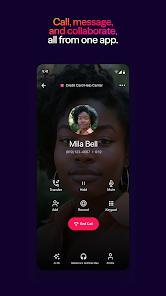
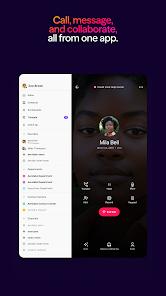
Dialpad is developed by Dialpad, Inc. Designed as an enterprise-grade Unified Communications as a Service (UCaaS) solution, Dialpad integrates real-time business voice services, SMS/MMS messaging, video conferencing, and team collaboration channels into a single, cohesive workspace. In professional environments where workforce mobility is standard, Dialpad provides an alternative to traditional, static desk phone systems.
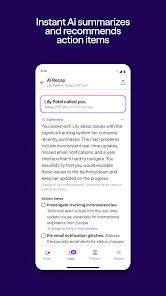
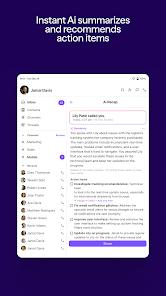
At the core of the Dialpad platform is Voice Intelligence™ (Vi), a proprietary, cloud-native Artificial Intelligence framework. Rather than merely recording audio payloads, Vi leverages real-time Natural Language Processing (NLP) models to transcribe spoken conversations instantly, perform sentiment analysis, extract action items, and deliver contextual recommendations to customer service agents during live interactions. When a call terminates, the platform automatically generates a structured call summary and transcript, reducing manual administrative effort and transforming voice communications into searchable database records.
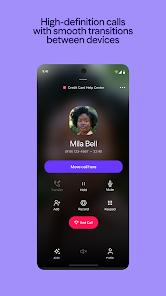
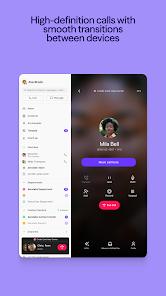
Another technical feature is its support for multi-device terminal handovers. Utilizing Session Initiation Protocol (SIP) and WebRTC pathways, Dialpad allows users to shift active, high-definition call sessions between a desktop app, desk phone, and an Android mobile device with a single tap. This dynamic routing is supported by deep integrations with business directories and CRM systems, including Salesforce and HubSpot, enabling the app to display client details, historical emails, and open service tickets alongside active call screens.
However, running these advanced real-time communication tools in the background requires significant system resources. The software's file size can exceed 113MB, and its continuous network synchronization can put a heavy load on older hardware. Additionally, strict background process restrictions in modern versions of the Android OS can occasionally cause incoming call notifications to fail, a challenge common to high-demand enterprise VoIP applications. Dialpad has different pricing tiers, including Essential Tier, Professional Tier, and Enterprise Tier. This demonstrates Dialpad's capability to scale its infrastructure from basic VoIP telephony to automated enterprise communications.
Pros & Cons
AI Voice Intelligence Transcription: Automatically transcribes spoken calls and captures action items in real time, eliminating the need for manual note-taking.
Seamless Session Handovers: Allows users to shift active calls between a desktop client, desk phone, and mobile device with a single tap.
Deep CRM Synchronizations: Integrates with Salesforce, HubSpot, and Google contacts, providing instant context during business calls.
Remote Leadership Coaching Panels: Enables supervisors to listen, whisper, and monitor call performance metrics remotely.
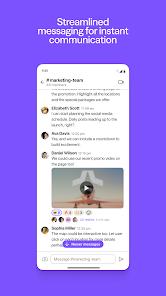
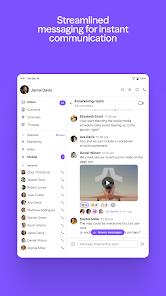
Unified Communications Dashboard: Combines voice calling, video conferencing, team chat, and SMS into a single interface.
- ✕
Significant System Resource Demands: The application features a large file size and consumes high memory, which can slow down entry-level devices.
- ✕
Missed Call Notifications: Aggressive OS background power management can occasionally delay or drop incoming VoIP calls.
- ✕
No Free Service Option: Access to AI transcription, advanced routing, and professional integrations requires a paid tier.
- ✕
Occasional Bluetooth Audio Delays: Connection handovers to vehicle audio systems can sometimes trigger false call states.
Download
 Get it on Google Play
  Get it on App Store
 FAQs
What is Dialpad Voice Intelligence (Vi)?
Voice Intelligence is Dialpad's AI processing engine. It automatically records, transcribes, and summarizes conversations, extracting action items and providing live coaching tips.
Can I move an ongoing call from my PC to my mobile phone?
Yes, Dialpad's multi-device platform allows users to hand over live sessions between a computer, a desk phone, and a mobile device with a single tap.
Does the app support CRM integrations?
Yes, the app links with CRM platforms like Salesforce and HubSpot, enabling professionals to view customer records and previous communications during an active call.
Can Dialpad be used for group video conferencing?
Yes, the platform includes unified video conferencing, screensharing, and group messaging alongside its standard voice-calling capabilities.
How secure is user communication data in the app?
All call data, messaging, and account credentials are encrypted in transit and protected by security standards, including Single Sign-On options.
Hot Reviews
This app excels at keeping all business communications organized. Having client calls, team text threads, and historical logs accessible in one place significantly improves productivity for remote account managers.
The Voice Intelligence transcription is remarkably accurate. Getting a complete, formatted written summary immediately after hanging up is a major time-saver that ensures no client detail is lost.
The mobile app occasionally fails to ring for incoming calls when running in the background. Users must regularly check the call log and call clients back because the system did not alert them in real time.
The call handover feature is highly reliable. Transferring active conversations from a computer to a mobile phone while walking out of the office works without any audio interruption.