
Moon+ Reader
Overview
Operating as one of the most powerful and highly customized digital document viewers on the Android platform, Moon+ Reader is built for power readers, researchers, and professional students who manage vast libraries of local documents. It functions as a versatile document-rendering engine that supports both local files and decentralized online catalogs (OPDS).
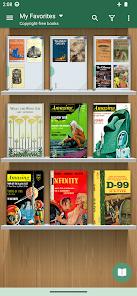
The primary technical asset of Moon+ Reader is its broad file format support. It handles standard e-book files like EPUB, PDF, AZW3, MOBI, and FB2, alongside rich-text, office, and archival formats including DJVU, DOCX, ODT, RTF, TXT, HTML, Markdown, and comic book files like CBZ and CBR. This extensive compatibility eliminates the need for multiple single-purpose reading apps, allowing users to manage novels, academic PDFs, coding manuals, and digital comics within a single unified shelf.
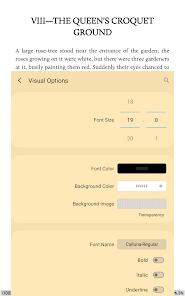
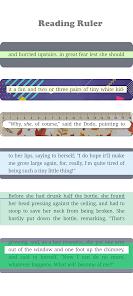
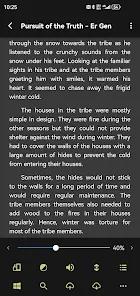
In terms of personalization, Moon+ Reader has no equal in the books and reference category. It offers granular adjustments for every visual variable, including line spacing, font sizing, margin scale, bold/italic rendering, text shadow, and alignment. Users can choose from over 10 embedded themes, adjust screen brightness instantly by sliding a finger along the left edge of the screen, and utilize eye health options to prevent fatigue during long reading sessions. Paging controls can be extensively customized, mapping page-turning actions to screen taps, swipe gestures, hardware volume keys, or even Bluetooth controller keys.
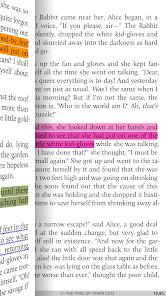
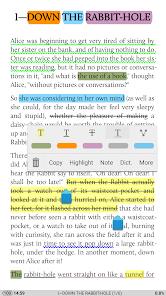
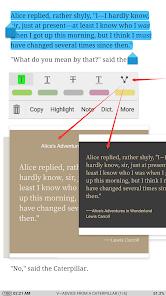
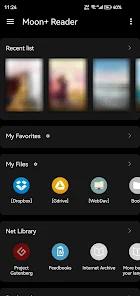
For file management and study, Moon+ Reader requires "All Files Access" permissions. This allows its powerful "My Files" system to catalog books saved across any folder, edit PDF annotations directly, and save imported documents to local storage. To ensure your reading progress, bookmarks, and highlights are never lost, the app supports seamless background synchronization with cloud storage services such as Dropbox and WebDAV.
The Pro version, available for a one-time purchase, unlocks an ad-free experience, Text-to-Speech (TTS) narration with shake-to-speak activation, headset/Bluetooth button support, reading statistics, and homescreen shortcuts for individual books, making it the ultimate tool for serious readers.
Pros & Cons
Unrivaled Format Versatility: Native support for EPUB, PDF, DJVU, MOBI, AZW3, DOCX, CBR, CBZ, and over a dozen other major formats.
Granular Visual Control: Precise customization of line height, font sizing, paragraph indentation, margins, alignment, and custom color themes.
Highly Customizable Operations: Map 24 distinct touchscreen tap, swipe, and hardware key operations to 15 different reading events.
Flexible Multi-Device Cloud Sync: Synchronizes bookmarks, notes, and exact reading positions reliably via Dropbox and WebDAV.
Advanced Multi-Mode Auto-Scrolling: Five distinct auto-scroll modes (rolling blind, pixel, line, page) with real-time speed controls.
Authentic Immersive Full-Screen: Implements a true immersive reading mode that prevents accidental triggers of the Android navigation bar.
- ✕
Overwhelming Ad Frequency in Free Version: The free version contains highly intrusive, unskippable pop-up ads when switching books or chapters.
- ✕
Technical Interface Learning Curve: The immense depth of configuration menus and gesture setups can overwhelm casual readers seeking a simple experience.
- ✕
Buggy Ad Dismissal Process: Users report frequent app freezes and glitches when attempting to dismiss ads or claim promotional ad-free periods.
- ✕
Demanding System File Permissions: The app requires "All Files Access" permissions, which may present privacy concerns for security-conscious users.
Download
 Get it on Google Play
  Get it on App Store
 FAQs
What formats are supported by Moon+ Reader?
The application supports a vast array of formats, including EPUB, PDF, DJVU, AZW3, MOBI, FB2, PRC, CHM, CBZ, CBR, UMD, DOCX, ODT, RTF, TXT, HTML, Markdown, and archive formats like RAR and ZIP.
How do I sync my reading progress across multiple Android devices?
You can enable cloud synchronization inside the app's miscellaneous settings, linking your reader to personal Dropbox or WebDAV accounts.
What are the key benefits of upgrading to the Pro version?
The Pro version removes all ads, adds Text-to-Speech (TTS) reading support, provides beautiful premium themes, offers detailed reading statistics, supports Bluetooth and headset controls, and allows password protection at startup.
Why does the application require "All Files Access" permissions?
This permission allows the built-in "My Files" manager to organize your e-books across all directories, write annotation edits back to local PDF files, and save book downloads directly to local storage.
Does the app support EPUB3 multimedia?
Yes. Moon+ Reader includes full support for advanced EPUB3 multimedia files, allowing users to play embedded audio and video content directly within the e-book.
Hot Reviews
The absolute best e-reader on Android. While the learning curve is slightly steep due to the sheer volume of visual and control settings, the level of customization is completely unmatched.
Unlike other developer teams, this app lets users watch a single advertisement in exchange for 48 hours of completely ad-free reading. It is a highly respectful approach to monetization.
The pop-up ads in the free version are extremely excessive. To make matters worse, attempting to close these ads often freezes the entire app, forcing a hard reset.