
Gallery
Overview
Gallery by Google was historically developed as Gallery Go under Google's Android Go initiative. This mobile application is a lightweight, responsive local media manager designed to bypass the hardware limitations of entry-level smartphones. In resource-constrained environments where device memory is limited and cellular network bandwidth is expensive or unavailable, this application functions as a high-performance alternative to cloud-centric media solutions. It operates as a direct physical reader of the device's internal storage, targeting specific partitions such as /DCIM, screenshots, downloads, and third-party application directories without creating heavy background processes.
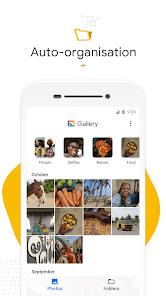
At the heart of the application is a localized machine learning engine. This system is built to process images in the background when the device is idle and charging, typically overnight. It uses lightweight computer vision algorithms to categorize photos into several structural folders, including People, Selfies, Nature, Animals, Documents, Videos, and Movies. By keeping these classification cycles entirely on-device, the app ensures user privacy and keeps media cataloging completely secure from cloud leakage.
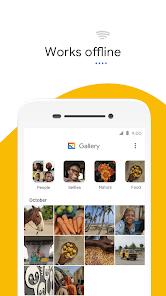
It supports local internal directories and physical MicroSD storage. The app is completely offline with ero background cellular data consumption. And it has extremely low package size and minimal active RAM usage. Direct localized indexing of on-device physical directory layers is also allowed.
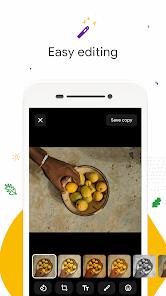
Beyond file management, the application features basic editing tools designed for quick adjustments. These include a single-tap auto-enhancement utility that adjusts exposure, contrast, and color balance, along with standard tools for cropping, rotating, and applying basic visual filters. By omitting heavy cloud-synchronization engines, the application provides a reliable, secure tool for users who want clean, fast local file management.
Pros & Cons
The application runs completely offline, ensuring stable performance in areas with weak or expensive internet connections.
Built-in machine learning sorts photos locally on the device, ensuring user privacy and keeping metadata secure.
The app is designed with a tiny installation footprint, leaving more storage space available for the user's photos and videos.
Full support for external MicroSD cards allows users to easily copy, move, and organize files across storage partitions.
Displaying only on-device media makes it easy to find and delete large junk files, downloaded images, and temporary screenshots.
- ✕
The user interface lacks month-by-month batch selection options, meaning users must manually select large groups of photos individually.
- ✕
Custom folder management is limited, as the app does not allow renaming existing albums without deleting and recreating them.
- ✕
Without built-in cloud backup tools, users risk permanent data loss if their physical device is damaged or lost.
- ✕
The editing suite is highly simplified, lacking professional tools like selective adjustments, color curves, and advanced AI-powered cleanup features.
Download
 Get it on Google Play
  Get it on App Store
 FAQs
How does the app organize photos into categories like People and Nature if it works completely offline?
The application uses a built-in, lightweight machine learning model that runs directly on the phone's processor. This model processes new images overnight when the device is plugged in and idle, grouping them without sending any data to external servers.
Will deleting an image in this application also delete it from other photo services on my phone?
Yes. Because this application operates as a direct manager of your phone's physical storage, deleting a file deletes it from the local drive, which will prompt cloud backup apps to delete their synced copies.
Can I rename my custom photo albums directly within the interface?
No, the current version of the application does not support direct album renaming. Users must create a new folder with the desired name, move the images over, and delete the original folder.
Does the application support viewing and editing professional RAW photo files?
No, this application is optimized for standard consumer formats like JPEG, PNG, and MP4. It does not have the processing capabilities or metadata support required for heavy RAW files.
Is this application pre-installed on Google Pixel devices?
No, Google Pixel devices come with the cloud-integrated photo service by default. However, users can download this lightweight gallery app as a fast, offline tool to manage on-device files.
Hot Reviews
Users appreciate how the app focuses strictly on local files, making it easy to find on-device images without getting them mixed up with large cloud libraries.
Many reviewers find the selection tools frustrating, noting that the inability to select photos by month makes organizing large libraries highly tedious.
The lack of a simple album renaming option is a frequent complaint, as users must delete and recreate folders just to fix a name.
Reviewers with older or budget devices praise the app's performance, noting that it opens instantly and navigates files without any stuttering.