
BambooHR
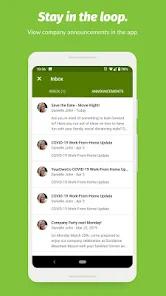
Overview
BambooHR is a human resources information system (HRIS) optimized for small and medium-sized enterprises. Recognizing the inefficiencies of managing growing workforces via manual spreadsheets, this app centralizes employee profiles, company calendars, and time-off workflows. The system organizes HR databases into self-service modules, allowing personnel to access vital employment statistics from mobile devices. This architectural framework reduces administrative bottlenecks by shifting routine data management to the employees themselves.
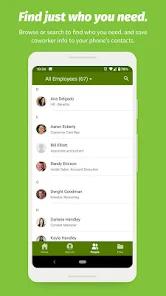
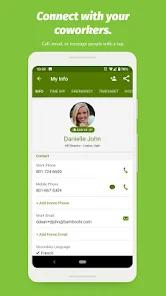
The core functional block of the mobile app is the interactive Company Directory. Employees can search and filter the directory by department, division, or geographical location, obtaining instant access to colleague records, photos, emails, and phone numbers. Contacts can be saved directly to the device's native address book with a single tap. Single Sign-On (SAML SSO) and biometric passcode support protect sensitive employee files from unauthorized access while maintaining a straightforward login path. Additionally, the app features custom company color themes, providing a familiar brand experience across the workforce.
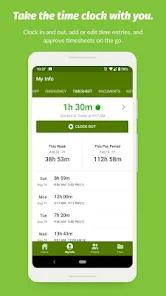
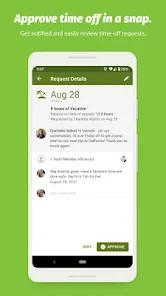
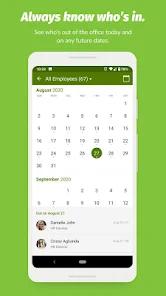
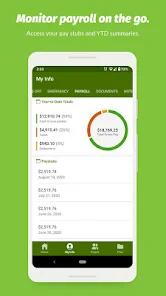
Leave administration is another key component of the mobile experience. Employees can check real-time Paid Time Off (PTO) balances, simulate future balances, and submit vacation requests directly through the app. Managers receive instant push notifications to approve or deny requests, complete with adjacent calendars showing who is currently out of the office. However, this simplified mobile layout omits several desktop features, which can lead to friction for advanced workflows. For example, the time-tracking system requires employees to log out completely to record breaks, rather than utilizing background timers or pause options. Similarly, changing project tasks requires clocking out and back in, and shift notes are bound by a rigid 200-character limit. The payroll portal is also highly simplified, displaying net and gross summaries while omitting a detailed breakdown of tax deductions.
Pros & Cons
Instant-Access Corporate Directory: Provides structured access to employee contact cards, roles, and profiles with direct tap-to-call or tap-to-email functionality.
Simplified PTO Management: Simplifies leave requesting, balance calculations, and manager approvals on the go.
Enterprise-Grade Access Security: Supports full SAML Single Sign-On (SSO) and localized passcode protection to protect sensitive personal records.
Dynamic Directory Filtering: Allows directory and time-off calendars to be filtered by division, department, or physical office location.
Automated Push Notifications: Keeps employees and managers aligned via real-time alerts on time-off request statuses.
- ✕
Rigid Time-Tracking System: Lacks quick break toggles, requiring employees to log out and log in again to record breaks.
- ✕
Cramped Pay Stub Layout: The pay stub portal is simplified, condensing deduction fields into a layout that can be difficult to read on smaller screens.
- ✕
No Seamless Desktop-to-Mobile Continuity: Fails to provide direct links to the full-featured desktop web interface for more complex tasks.
- ✕
Inflexible Project Switching: Forces users to fully clock out of the system before they can select and log time under a different project category.
Download
 Get it on Google Play
  Get it on App Store
 FAQs
Can employees use the mobile app without an active, paid corporate subscription?
No, accessing any tool within the mobile client requires an active BambooHR account authorized by the employer.
Does the app allow directory information to be accessed offline?
No, directory searches, time-off requests, and calendar updates require a live internet connection to sync with the central HR database.
Can managers review who else is scheduled for time off before approving a new request?
Yes, the app features an out-of-office calendar that displays current and future absences, helping managers maintain proper staffing levels.
Is it possible to upload photos or shift notes directly to a specific project folder?
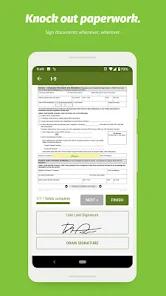
No, uploaded documents and photos are sent to a general file storage folder rather than structured project-specific directories.
Can the application's interface be customized to match corporate identity guidelines?
Yes, the system automatically pulls company brand colors from the web setup, skinning the mobile dashboard to match corporate guidelines.
Hot Reviews
Logging breaks is tedious because the app requires a full clock-out, which fails to track break durations automatically, and project transitions require restarting the entire logging sequence.
The earnings statement layout is cluttered and difficult to read, hiding essential tax deduction breakdowns while displaying text in overlapping, mismatched fonts.
The application excels at showing available PTO hours, simplifying vacation requests, and providing fast access to peer contact information.