
Opera: Private Web Browser




Overview
The Android application with the package name com.opera.browser, published by Opera, is a highly mature web browser built on the open-source Chromium project. Opera has carved out a unique position in the competitive browser landscape by offering a comprehensive, multi-functional platform out of the box, avoiding the need for complex, third-party browser extensions. It combines high-performance rendering speeds with an array of integrated tools focused on online anonymity, user protection, data compression, and modern artificial intelligence assistance.
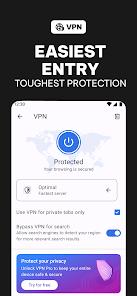
A defining differentiator of Opera is its integrated Virtual Private Network (VPN). Unlike standard web browsers that require users to pay for external subscription services, Opera provides a native, unlimited-traffic VPN entirely for free. The VPN encrypts all outgoing internet traffic originating within the browser, masking the user's IP address and routing sessions through over 3,000 global servers. This setup allows users to bypass local network blockages and browse securely on public, unencrypted Wi-Fi networks. Users can choose three general, regional virtual locations. No registration or login required.
Complementing its privacy suite is a native ad blocker and cookie banner suppressor. By preventing tracking scripts, video ads, and intrusive pop-ups from loading, the browser significantly reduces bandwidth consumption and accelerates page rendering speed. For users facing strict data caps or weak network signals, Opera features a Data Savings mode that compresses images and videos server-side before downloading them to the client device, optimizing browsing performance in remote areas.
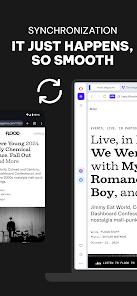
Opera also integrates Aria, a built-in, conversational AI assistant powered by advanced language models. Aria enables users to summarize complex web articles, generate copy, write code, or create unique images through an integrated AI image generator. Cross-device data flow is simplified through the "Flow" feature. By scanning a simple QR code, users can instantly share links, documents, images, and custom notes between their Android devices and desktop installations of Opera with full end-to-end encryption.
Pros & Cons
It includes a built-in, unlimited free VPN that encrypts in-browser traffic and hides user IP addresses without a subscription.
Aria AI integration allows users to write content, generate custom images, and summarize lengthy web articles on the fly.
The native ad and tracker blocker significantly accelerates page loads and blocks annoying cookie consent prompts.
Efficient Data Savings mode utilizes cloud-based compression algorithms to minimize bandwidth consumption on cellular connections.
The Flow interface provides instant, encrypted file and link sharing between mobile and desktop devices via QR code.
Integrated offline reading tools support page saving as static local files or immediate PDF conversions.
- ✕
The default start page layout displays excessive news feeds, sports trackers, and promotional widgets.
- ✕
The free VPN tier is restricted to general geographic regions, preventing the selection of specific country servers.
- ✕
The browser shares device identifiers and analytical telemetry with advertising platforms by default.
Download


FAQs
Is the built-in VPN inside Opera completely free?
Yes, the integrated browser VPN is free, has no bandwidth caps, and does not require users to register an account or log in.
Does Opera's VPN encrypt traffic from other applications on my phone?
No, the free VPN built into the standard browser only encrypts traffic initiated inside the Opera browser. To secure the entire device, users must upgrade to their premium VPN Pro service.
How does the Aria AI assistant generate images?
Aria is backed by advanced generative AI engines. Users can access the chat assistant and enter descriptive text prompts to generate custom visuals directly within the browser interface.
What is the "Flow" feature?
Flow is an encrypted, private link that syncs files, links, photos, and notes seamlessly between mobile and desktop instances of Opera by scanning a secure QR code.
Does the browser support offline reading?
Yes, Opera features an Offline Pages manager alongside a "Save as PDF" utility, allowing users to save web pages directly to local storage to read when disconnected from the internet.
Hot Reviews
The Flow connection is incredibly efficient, allowing users to instantly send photos, notes, and links between their phone and PC without using email or messaging apps.
Opera's integrated ad blocker provides a clean web experience, immediately blocking heavy video ads and annoying cookie consent pop-ups by default.
The initial setup displays an excessive amount of news headlines and sponsored links, requiring manual customization to create a clean browsing environment.