
Picsart Animator: GIF & Video

Overview
Picsart Animator, developed by PicsArt, Inc., represents a lightweight, hand-drawn 2D animation engine designed to introduce mobile users to sequential art creation. While traditional professional animation applications require a deep understanding of complex keyframing, motion paths, and bone rigging, Picsart Animator lowers this barrier to entry through an intuitive, frame-by-frame raster interface. Operating as an entirely free and ad-free platform, the application serves as an accessible tool for educational settings, social media content creators, and hobbyists experimenting with mobile animation.
Sequential Timeline and Frame Management Architecture
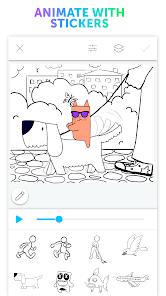
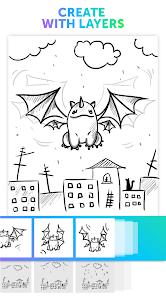
At the core of Picsart Animator is an interactive frame timeline that lets users scroll through sequential frames, control frame rates, and preview playback on the fly. The frame management system is optimized for fast editing, allowing creators to duplicate, insert, and delete individual frames with minimal latency. This performance is supported by a multi-layer drawing system, which allows animators to separate foreground movements from static background illustrations, reducing the need to manually redraw stationary elements across the timeline.
The application's brush engine features a modest selection of customizable sketching and painting brushes. While it lacks the advanced particle physics of high-end drawing engines, it supports pressure dynamics to help artists vary line weights. A key feature of the drawing workspace is its rotoscoping capability, which allows animators to load photographs from their device gallery or capture live camera frames to sketch over, simplifying the process of creating stylized, animated selfies.
Specialized Motion Pathing and Audio Integration
To speed up the animation process, the application features path-based motion tracking for animated stickers and personal avatars generated through the "Emoji Me" tool. Instead of manually plotting frames, creators can draw a physical vector path across the canvas for a sticker to follow, with the engine automatically interpolating the movement. Sound design is accommodated through an integrated audio tool that lets users record direct voiceovers via the device microphone, syncing the audio track along the active timeline.
However, the application’s focus on simplicity comes with clear functional limitations. Unlike desktop-class suites, it lacks virtual camera tools for panning, zooming, or scaling, which forces animators to manually adjust their art to simulate camera moves. Additionally, the sound engine is structurally isolated; it lacks support for direct, local music file imports, meaning users must record ambient audio through the microphone to add soundtracks. Despite these limitations, its lightweight design and free monetization model make it an excellent introduction to mobile animation.
Pros & Cons
The application is entirely free to download and use, with no hidden subscriptions or in-app ads.
An intuitive frame timeline simplifies duplicating, inserting, and managing sequential frames.
Rotoscoping capabilities allow users to draw directly over imported gallery photos or camera frames.
The multi-layer canvas setup lets animators separate moving characters from static backgrounds.
Path-based motion tracking simplifies animating pre-rendered stickers and custom emojis.
- ✕
Lacks virtual camera controls, making it impossible to pan or zoom across a wide background canvas.
- ✕
The audio timeline does not support direct digital imports of local music or sound files.
- ✕
The layer manager lacks advanced options like layer merging, clipping masks, or group folders.
- ✕
Tutorial resources can be difficult to find, often redirecting users to confusing external websites.
Download
 Get it on Google Play
  Get it on App Store
 FAQs
Is Picsart Animator entirely free to use?
Yes, the application is offered completely free of charge, with no in-app advertisements or premium feature paywalls.
Can I import MP3 files to sync with my animations?
No, the application does not support direct local audio file uploads; users are limited to recording real-time vocal tracks using the device microphone.
What file formats does the app support for saving and exporting?
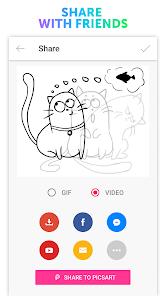
Completed animations can be exported and shared as either animated GIF files or standard MP4 videos.
Does Picsart Animator support onion skinning?
Yes, the app features onion skinning, which displays a semi-transparent preview of adjacent frames to help align character movements.
Can I merge layers to optimize my project file?
No, the application’s layer panel does not include advanced layer-merging or grouping features.
Hot Reviews
The timeline controls make learning frame-by-frame animation remarkably straightforward, though a physical stylus is recommended for fine-detail work.
While the core drawing tools work well, the lack of a virtual camera panning tool makes simulating movement across large background landscapes very tedious.
The multi-layer system works smoothly for basic scenes, but having to record audio via the microphone instead of importing clean audio files limits the final sound quality.