
PS Remote Play
Overview
PS Remote Play is a cornerstone of first-party console-to-mobile streaming ecosystems, bridging dedicated home entertainment hardware with mobile clients. The application requires a fast and stable internet connection, with 5 GHz Wi-Fi or high-speed cellular data as a prerequisite.
Client performance is heavily tied to the host console's hardware encoding capabilities and the decoding performance of the mobile endpoint. For example, verified devices such as the Google Pixel 7, 8, and 9 series benefit from hardware-accelerated decoders that minimize input lag to near-imperceptible levels. Conversely, legacy PlayStation 4 consoles frequently struggle with real-time encoding overhead, leading to higher rates of frame drops, decoding artifacts, and application lockups under sustained loads.
Input handling is another critical area of interest. Under Android 10 and 11, physical controller support was limited to basic layouts. However, the integration of native driver profiles in Android 12 enabled full support for the DualSense wireless controller. Android 14 expanded this to include the DualSense Edge wireless controller, allowing for custom deadzones and trigger curves. Despite these advancements, users playing on unverified hardware often experience varying input latency, as non-standard Bluetooth drivers can introduce polling delays. Third-party alternatives, such as PXPlay, address these driver issues by using custom input polling loops and offering advanced features like FidelityFX Super Resolution (FSR) upscaling to reconstruct image details on high-resolution mobile displays.
Pros & Cons
Seamless First-Party System Integration: Direct synchronization with the PlayStation Network and official system software eliminates the need for manual network mapping.
Direct DualSense Driver Support: Leverages official Android controller APIs on modern OS versions to support advanced features, such as haptic feedback and adaptive triggers.
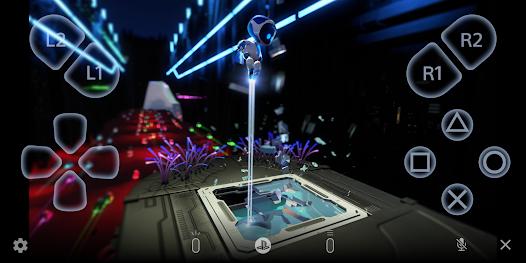
On-Screen Control Overlay: Features a customizable virtual gamepad for playing games without physical accessories.
Integrated Voice Communication: Routes local mobile microphone data directly to console party chats in real time.
Integrated Keyboard Input: Allows users to input text on their console via their mobile keyboard.
- ✕
Input Lag on Unverified Devices: Devices without optimized chipsets suffer from decoding bottlenecks, causing noticeable input delay.
- ✕
Network Sensitivity: Highly susceptible to packet loss, which can cause sudden video compression artifacts or disconnects.
- ✕
Poor Legacy Console Performance: Experiences higher error rates and stream crashes when paired with base PS4 models.
- ✕
High Bandwidth Consumption: Consumes substantial data when streaming over cellular networks, far exceeding standard video platforms.
Download


FAQs
What are the minimum system requirements for PS Remote Play?
The application requires an Android device running Android 10 or later, a PlayStation 4 or PlayStation 5 console updated to the latest system software, an active PlayStation Network account, and a high-speed internet connection.
Can the DualSense controller be used with any Android phone?
While the app can be installed on most modern Android devices, full compatibility with the DualSense wireless controller requires Android 12 or later, and the DualSense Edge requires Android 14 or later.
Does the app function over mobile data networks?
Yes, the application supports cellular streaming. However, its performance depends on carrier stability and signal quality, and it consumes substantial mobile data.
Why does the controller vibrate differently during remote play?
Telemetry data for haptic feedback and adaptive triggers must be compressed for wireless transmission, which can make vibrations feel different from native local console play.
Why does the stream occasionally freeze on older PlayStation 4 consoles?
The older system architecture of legacy PS4 consoles can struggle to encode live gameplay streams while simultaneously running demanding games, leading to occasional performance drops.
Hot Reviews
The application works exceptionally well when connected to a PlayStation 5, demonstrating high frame rates and minimal latency during action-heavy sequences.
When paired with older PlayStation 4 hardware, the streaming interface frequently suffers from frame freezes and connection drops.
Users often report that even minor local network fluctuations can cause immediate disconnection, requiring a tedious manual pairing cycle to recover.