
Life Bible

Overview
The Life Bible App is an advanced study and devotional tool designed for both casual readers and serious theological students. Developed by Tecarta Inc., the software is designed to improve discoverability and broaden its appeal to a lifestyle-oriented audience. Architecturally, the application is engineered for rapid, multi-text comparative analysis, making it an excellent choice for users who want to compare different translation nuances side-by-side.
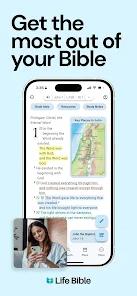
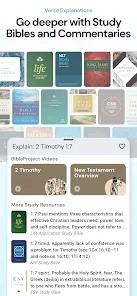
At the core of the platform's capability is its parallel search engine. While traditional Bible apps restrict search queries to a single active database, Life Bible can search over 40 translations simultaneously, presenting results in a consolidated panel. This allows users to quickly compare how different versions, such as the New International Version (NIV), English Standard Version (ESV), and New Living Translation (NLT), handle specific keywords. The study interface also features a split-screen layout, enabling readers to view the biblical text alongside respected study guides (like the MacArthur Study Bible) and extensive commentaries (such as Matthew Henry or Thru the Bible).
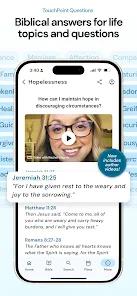
The TouchPoints topical index is another central feature. This proprietary system indexes over 350 everyday life questions, mapping them directly to relevant scriptures and guided biblical answers. This bridging of ancient scripture with modern life applications transforms the app into an active tool for daily mental and spiritual well-being. Additionally, the app offers an optimized sermon note-taking environment. With an intuitive "quick-paste" feature, users can quickly copy biblical passages directly into their personal, rich-text study journals during fast-paced services.
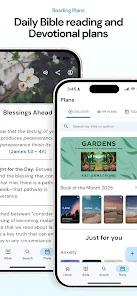
From a technical standpoint, Life Bible secures data in transit and allows users to request the deletion of their accounts and saved data. However, the software collects certain personal data, including user messages and identifiers, to keep custom study folders and highlights synchronized across devices. Recent updates have added customizable streak-tracking tools, multi-verse highlights, and smoother journal syncing, allowing users to customize their daily reading habits.
Pros & Cons
Simultaneous Translation Searching: Queries over 40 translations at once, making comparative research exceptionally fast.
Seamless Split-Screen Layout: Displays scripture, commentary, and study notes side-by-side within a unified window.
Free TouchPoints Topical Guide: Provides scriptural answers to over 350 everyday life questions.
Optimized Sermon Note Workspace: Rich-text features and a "quick-paste" tool let users take detailed notes without losing focus during church services.
Cross-Device Syncing: Automatically backs up notes, highlights, and purchases to all mobile and web devices.
- ✕
Distracting Ad Integration: Recent updates have introduced ads onto the home screens of some users who had previously paid for ad-free versions.
- ✕
Confusing Rebranding and Overhauls: Rebranding and frequent interface redesigns have created a steep learning curve for long-time users.
- ✕
Potential Data Loss During Migrations: Some users report losing custom journals and notes during software updates.
- ✕
Bluetooth Audio Connectivity Issues: Background processes can cause the audio player to auto-connect to vehicle speakers unexpectedly.
Download
 Get it on Google Play
  Get it on App Store
 FAQs
How do users compare different Bible versions side-by-side?
Users can activate the split-screen layout in the viewer, allowing them to load different translations in adjacent panels for direct comparison.
Why did the app change its name from Tecarta Bible to Life Bible?
The developer rebranded the app in 2023 to simplify discovery, make the name easier to spell, and align the software with a lifestyle-focused devotional model.
Are downloaded translations available without an internet connection?
Yes, users can download purchased or streamed translations to local device storage for complete offline access.
Can the daily reading streak tracking be turned off?
Yes, the recent updates allow users to toggle reading streak tracking on or off within the settings menu.
How are custom study journals backed up?
The app automatically syncs notes, highlights, and bookmarks to the cloud when users log in, making them accessible across all web and mobile platforms.
Hot Reviews
Churchgoers highly praise the "quick-paste" and split-screen features, noting they can easily copy sermon scriptures into personal journals without falling behind the speaker.
Long-time users express frustration with recent updates that introduced ads on home screens, even after they had purchased premium study materials years prior.
Reviewers frequently commend the multi-translation search engine, stating it saves hours of study time by querying dozens of Bible versions simultaneously.
Several users report that major app updates disconnected their profiles and deleted years of highlighted study history, requiring support intervention to recover.