RoughAnimator - animation app
Overview
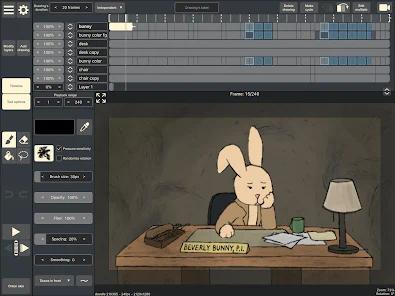
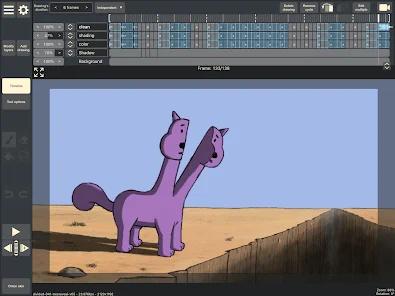
The mobile application RoughAnimator represents a highly specialized, professional-grade raster animation engine designed specifically for frame-by-frame, hand-drawn 2D animation. Developed by WeirdHat, the application prioritizes raw functional utility over decorative design. This architectural choice manifests in a minimalist, highly efficient user interface that minimizes graphics processing unit (GPU) overhead, ensuring consistent rendering performance even when compiling complex multi-layered sequences on standard mobile hardware.
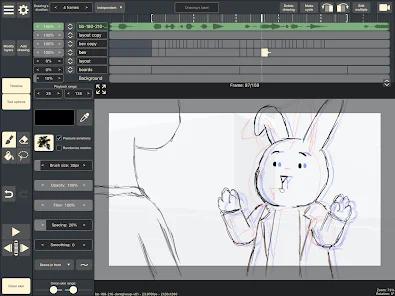
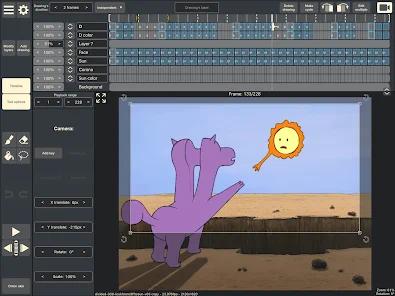
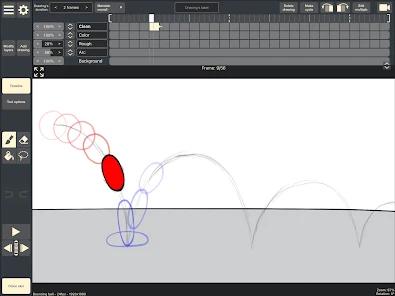
The application supports unlimited layers and individually adjustable frame exposure lengths. Unlike consumer animation applications that enforce rigid, globally defined frame durations, this timeline allows animators to utilize traditional pose-to-pose or straight-ahead techniques with variable timing. The application supports advanced onion skinning, enabling animators to view customizable overlays of preceding and succeeding frames. This visualization is critical for maintaining volume consistency, managing spacing, and refining motion arcs across complex sequences. It allows users to output works without watermarks.
The application also features direct multimedia ingestion pipelines. Users can import audio tracks to facilitate precise phonetic lip-syncing, as well as video files to serve as reference layers for rotoscoping. These operations are executed locally, maintaining high frame fidelity during playback and scrubbing. The application supports pressure-sensitive stylus protocols, such as Samsung’s S-Pen API, allowing for dynamic line-weight variance based on physical pressure.
For professional integration, the application can export projects directly into industry-standard desktop pipelines, including Adobe Animate (formerly Flash), After Effects, and Toon Boom Harmony. This design choice positions the mobile application not merely as a standalone sketching tool, but as a portable extension of professional studio environments. It offers one-time upfront purchase.
Pros & Cons
Supports unlimited timeline layers, allowing animators to manage complex background, foreground, character, and effects layers without artificial restrictions.
Utilizes a one-time upfront purchase model ($7.99) with no recurring subscriptions, hidden in-app purchases, advertisements, or watermark penalties.
Supports direct, native export of project files into desktop platforms like Adobe Animate, After Effects, and Toon Boom Harmony, preserving frame structures.
Integrates advanced hardware stylus APIs, enabling precise pressure-sensitive rendering and natural line variation when using the Samsung S-Pen.
Facilitates advanced rotoscoping and audio synchronization through local video and audio import pipelines.
- ✕
Features a basic, retro user interface that lacks modern aesthetics, which can create a steep initial learning curve for novice users.
- ✕
Provides a highly restricted native brush library with limited default texture presets, requiring manual brush adjustments to achieve varied artistic styles.
- ✕
Lacks an integrated cloud-backup system, making users fully responsible for manual project backups and device-to-device transfers.
- ✕
Experiences occasional file import failures or application crashes when processing highly compressed or non-standard audio container formats.
Download


FAQs
Can animators edit RoughAnimator projects across both mobile and desktop versions?
Yes. The application utilizes a unified project format, allowing animators to transfer native project directories between Android, iOS, and desktop operating systems without losing layer structure or audio-visual sync.
Does the application support vector layers or is it purely raster-based?
RoughAnimator is primarily a raster-based drawing engine. This architecture ensures high-performance brush rendering and pixel-perfect traditional drawing manipulation, although it does not scale infinitely like vector-only formats.
Is an active internet connection required to utilize the software?
No. The application executes all rendering, timeline processing, audio scrubbing, and file exports locally on the device's hardware, allowing for offline workflows.
What file formats are supported for exporting completed animations?
Completed sequences can be exported as Quicktime-compatible video files, animated GIFs, or sequential PNG images with optional transparency.
How does the exposure adjustment mechanism operate on the timeline?
Animators can tap on any individual frame and adjust its exposure duration directly. This enables variable timing (e.g., animating "on twos" or "on threes") within a single layer.
Hot Reviews
Reviewers transition from consumer-oriented options to this utility, praising the timeline layout and the absence of paywalled creative layers.
Artists note that the lack of advanced texturing tools, such as default airbrushes, requires them to spend time creating custom brush configurations.
Some users report file system errors when attempting to import compressed WAV or MP3 files, resulting in application crashes.
Users find the playback scrubbing and frame-stretching tools highly responsive, noting they match the speed of desktop applications.