Hubspace
Overview
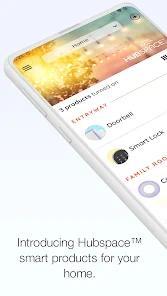
Hubspace, powered by the Afero IoT platform, represents a strategic move by The Home Depot to establish a proprietary smart home ecosystem that prioritizes accessibility and security over the "subscription-first" models of many competitors. Launched in 2021 and receiving a major "2.0" update in late 2025, Hubspace manages an exclusive range of products from brands like Hampton Bay, EcoSmart, and Defiant. The application is built upon Afero's foundation of "banking-level encryption," ensuring that the management of smart lighting, ceiling fans, and security systems remains private and resilient against external threats.
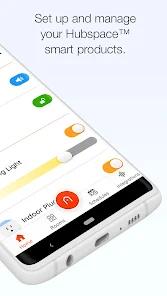
An in-depth feature breakdown reveals that Hubspace is designed for rapid deployment. Utilizing a QR-code-based setup, users can integrate new smart devices—such as recessed lighting, thermostats, or water controllers—in a matter of minutes. Version 2.0 introduced the "Hubspace Connect" feature, a breakthrough in digital control that decouples physical wiring from the application interface. This allows a "powered by Hubspace" switch in one room to control lights in another without being on the same electrical circuit, essentially creating a virtual three-way switch or a whole-home scene with no additional electrical work. Furthermore, the app includes "Circadian Lighting," which automatically adjusts color temperature throughout the day to align with the human biological clock, and a "Vacation Mode" that randomizes lighting patterns to simulate home occupancy.
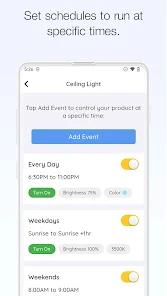
Insightful observations of Hubspace's market positioning suggest it is a direct challenge to premium ecosystems, specifically targeting homeowners who seek sophisticated automation without the "hub" requirement or recurring fees. By integrating with Google Assistant and Amazon Alexa, Hubspace offers hands-free control that rivals more expensive systems. However, user feedback indicates that while the hardware is inexpensive and the security is robust, the software still faces hurdles in "power-user" functionality. Specifically, the current inability to apply a single schedule to an entire group of lights—requiring individual scheduling for each bulb—remains a point of contention for those with large-scale installations. Despite these minor software limitations, Hubspace has achieved a 4.7-star rating, reflecting a high degree of satisfaction with its reliability and "free-forever" remote access model.
Pros & Cons
The application is entirely free to download and operate, with no subscription requirements for remote access or cloud-based automation features, making it a highly economical choice for smart home enthusiasts.
Security is a cornerstone of the platform, utilizing enterprise-grade encryption and rigorous identity management certified by third-party laboratories.
The QR-code setup process is exceptionally user-friendly, allowing for device integration in minutes without the complex pairing procedures found in older IoT systems.
Version 2.0’s Hubspace Connect feature provides unprecedented flexibility, allowing switches to control any Hubspace-enabled device regardless of physical wiring.
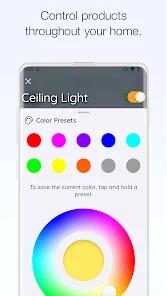
Advanced lighting features, such as Circadian rhythms and logarithmic brightness control, offer a level of environmental customization usually reserved for much higher-priced systems.
The platform’s broad device support covers everything from smart sprinkler controllers to bath fans and chest freezers.
Finally, the seamless integration with major voice assistants ensures that Hubspace products can be easily incorporated into existing smart home routines.
- ✕
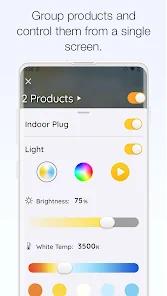
Users have highlighted a significant limitation in the grouping functionality, specifically the inability to easily schedule a single routine for an entire room of lights simultaneously.
- ✕
The thermostat interface has been criticized for skeuomorphic slider bugs, where controls can initialize to values outside the visible range, making them difficult to adjust in "Auto" mode.
- ✕
Additionally, the hardware ecosystem is currently restricted to Home Depot exclusive brands, which may limit aesthetic choices for some consumers compared to universal platforms.
Download


FAQs
Do Hubspace devices require a separate bridge or hub?
Most Hubspace products connect directly to Wi-Fi or use Bluetooth for local setup, eliminating the need for a central bridge.
How does "Vacation Mode" improve home security?
Unlike static timers, this feature turns lights and smart plugs on and off at random intervals every hour, creating a more realistic appearance of presence in the home.
What should I do if my QR code is missing or damaged?
Users can manually enter the product’s setup code found on the device label into the Hubspace app to initiate the connection process.
Can I control Hubspace products when I am away from home?
Yes, the app provides secure remote access via the cloud at no additional cost, provided the devices are connected to an active Wi-Fi network.
Does Hubspace work with Apple HomeKit?
Currently, the platform focuses on direct integration with Google Assistant and Amazon Alexa; HomeKit support is not natively advertised.
Hot Reviews
Reviewers frequently praise the app for its "plug-and-play" feel. The ability to simply scan a code on a light bulb or outlet and have it immediately recognized by the system is cited as a major improvement over competitors.
A common point of feedback involves the software's inability to push a single schedule to multiple devices in a group. Users with complex lighting setups find it "annoying" and "inefficient" to have to program each individual recessed light one by one.
While the app is praised for its stability and security, some users have reported specific UI issues, such as thermostat sliders getting "stuck" or the lack of specific "flicker" settings for smart candelabra bulbs.