
Tor Browser


Overview
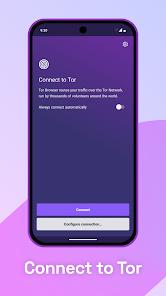
Online tracking often makes standard web traffic vulnerable to surveillance, profiling, and censorship. To address these concerns, Tor Browser serves as the official mobile browser developed by the Tor Project. Rather than routing traffic directly from the user's IP to a destination server, Tor routes connections through three layers of volunteer-run relays around the world. This onion routing process makes it difficult for network observers, internet service providers (ISPs), or target sites to trace traffic back to its origin.
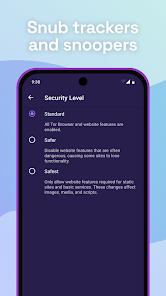
The app's security model focuses heavily on standardization to resist browser fingerprinting. Tor Browser configures all client browsers to report identical hardware parameters, screen ratios, system fonts, and user agents, making individual users indistinguishable from one another within the network. It integrates the NoScript extension by default, which blocks active scripts like JavaScript, WebGL, and Flash that could be exploited to bypass the proxy and reveal the device's true IP. It has three layers of nested encryption. Furthermore, the app clears cookies, cached files, and browsing history automatically whenever a session ends.
While onion routing provides excellent privacy, it introduces substantial performance challenges. Routing data through multiple global nodes increases latency, resulting in slower page load speeds compared to standard browsers. Additionally, some web administrators block traffic originating from known Tor exit nodes, which can cause connection issues, broken pages, or persistent CAPTCHA challenges.
Pros & Cons
Decentralized Multi-Layered Onion Encryption: Encrypts traffic three times across separate entry, middle, and exit relays to prevent single-point tracking.
Standardized Fingerprint Minimization: Normalizes browser and device parameters to ensure all users look identical, preventing tracking without relying on cookies.
Automatic Memory and Cookie Purges: Clears all active cookies, cached data, and browsing history automatically when the session is closed.
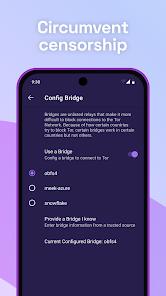
Censorship and Firewall Circumvention: Helps users bypass local ISP blocks, firewalls, and regional restrictions to access the open web.
Access to Specialized Onion Services: Provides direct access to specialized hidden services and Tor-specific sites that are unreachable through standard browsers.
- ✕
High Latency and Slow Connection Speeds: Rerouting traffic across multiple global nodes increases latency, making high-bandwidth activities impractical.
- ✕
Frequent Website Breakage and Script Blocks: Blocking active scripts and utilizing blacklisted exit IPs can cause pages to load incorrectly or trigger continuous CAPTCHA prompts.
- ✕
Traffic Interception Risk at Exit Nodes: If a website does not use end-to-end encryption (HTTPS), unencrypted data can be monitored at the exit node.
- ✕
Stigma and ISP Network Tagging: Even when browsing legally, using Tor can occasionally flag connections as suspicious to ISPs or network administrators.
Download


FAQs
Does the Tor Browser hide my online activity from my Internet Service Provider?
Your ISP can see that you are connecting to the Tor network, but they cannot see the specific websites you visit or the data you transmit.
Is it necessary to run a separate VPN alongside the Tor Browser?
While not strictly required, a VPN can hide Tor usage from your ISP, though misconfiguring this setup can sometimes compromise anonymity.
Why are some websites blocked or broken when browsing with Tor?
Many commercial sites block known Tor exit nodes to prevent automated spam, and blocking JavaScript via NoScript can prevent interactive web elements from loading.
Are my passwords safe if I log into personal accounts using Tor?
Logging into personal accounts identifies you to that website, which can compromise anonymity; additionally, if HTTPS is not active, login credentials can be captured at the exit node.
Is using the Tor Browser legal?
Tor is legal for general browsing in most democratic countries, though some authoritarian regimes restrict or ban its use.
Hot Reviews
Users frequently commend the browser's ability to access blocked content and bypass local network restrictions without leaving a data footprint.
A common point of frustration is the noticeable drop in speed, with users acknowledging that the privacy of onion routing comes at the cost of slow page loads.
Reviews highlight the convenience of the dedicated quit button, which instantly erases open tabs, cookies, and cached data, leaving no traces behind.
Some reviewers suggest integrating popular ad-blocking extensions, like uBlock Origin, by default alongside NoScript to further clean up the browsing experience.