
Bible Gateway
Overview
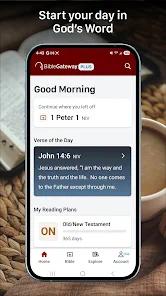
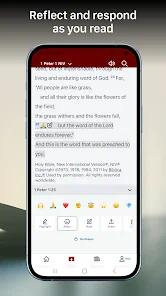
The Bible Gateway application, published by HarperCollins Christian Publishing, represents one of the longest-standing digital portals for biblical study, leveraging over three decades of brand authority. Architecturally, the application functions as a hybrid system that bridges a deep web-portal database with a localized mobile e-reading environment. By providing users with free access to an expansive library of over 200 Bible translations spanning more than 70 languages, the application serves as a massive reference tool for multi-translation cross-referencing and comparative study.
The core functional value of Bible Gateway lies in its "Parallel View" interface, which is highly optimized for tablet displays. This feature allows theological researchers to read two different translations side-by-side. For example, a researcher can view a highly literal word-for-word translation like the English Standard Version (ESV) next to a dynamic equivalence translation like the New Living Translation (NLT). This dual-pane reading setup makes it much easier to identify subtle nuances in source-text translation.
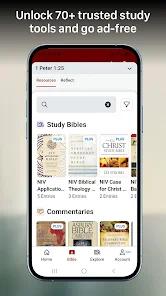
For users seeking deeper scholarly engagement, the application offers an upgrade path to "Bible Gateway Plus". This premium software-as-a-service (SaaS) subscription, priced at approximately $89.99 annually, unlocks a curated suite of over 60 respected study tools, including the NIV Study Bible, the MacArthur Study Bible, the Tony Evans Study Bible, and the Believer's Bible Commentary. By integrating these resources directly alongside the biblical text, the application acts as a portable, lightweight theological library.
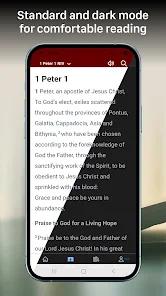
However, the application’s transition into modern mobile designs has faced some friction. Recent visual overhauls aimed at modernizing the user interface have drawn criticism for feeling sterile and less intuitive than previous versions. Users have reported technical issues, such as difficulties accessing historically saved personal notes, audio playback freezes that prevent continuous chapter-to-chapter playing, and scrolling desynchronization during parallel translation comparisons. This highlights a common challenge in product design: balancing modern visual trends with the highly structured layouts required for intense textual study.
Pros & Cons
Unmatched Translation Library: Provides access to over 200 distinct translations in 70+ languages, catering to both mainstream and niche linguistic study needs.
Advanced Parallel View: The tablet-optimized side-by-side reading view makes comparative textual analysis fast and intuitive.
Affordable Study Library: Gateway Plus provides affordable access to premier commentaries and study Bibles that would otherwise be highly expensive in print format.
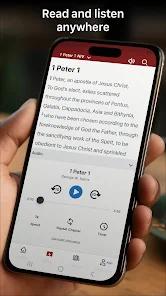
Linguistic Versatility in Audio: Features over 30 distinct audio Bibles in major international languages, facilitating hands-free engagement during travel or commutes.
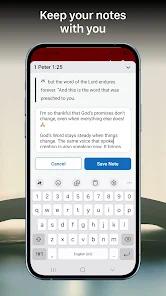
Multi-Platform Cloud Sync: Seamlessly synchronizes user-generated notes, highlights, and reading plan progress across mobile devices and desktop browsers via a free cloud account.
- ✕
Disruptive Advertising: The free version is heavily ad-supported, featuring highly intrusive pop-up ads that can interrupt the reading experience and break study focus.
- ✕
Redesign Performance Regressions: Recent updates have introduced software bugs, including issues where parallel verse comparisons lose tracking and default back to the first verse of a chapter.
- ✕
Audio Interruption Glitches: Legacy users report a recurring bug where audio playback stops at the end of a single chapter instead of advancing continuously.
- ✕
High Cost for Casual Users: The annual subscription tier is relatively expensive if the user does not routinely consult scholarly commentaries.
Download
 Get it on Google Play
  Get it on App Store
 FAQs
Can I access Bible Gateway translations when offline?
Yes. Within the translation selection menu, users can tap the download icon next to select versions (such as the NIV, ESV, or KJV) to store the text locally on their device, enabling offline reading.
What resources are included in the Bible Gateway Plus subscription?
Upgrading removes all advertisements from the app, unlocks over 60 study resources (including study Bibles and dictionaries), and adds advanced audio playback controls like adjustable speed.
How does the app synchronize personal notes across devices?
By creating a free Bible Gateway account, your highlights, notes, and reading plan progress are automatically backed up and synchronized across devices.
Why does the audio Bible stop reading after only one chapter?
This is a known bug introduced in recent versions. To resolve this, users should log out of their free account and log back in, or check for the latest bug-fix update in the Play Store.
Does the app support parallel viewing on standard mobile phones?
While parallel side-by-side viewing is fully optimized for tablet-sized screens, smartphone users can access parallel translations by utilizing the comparison features or rotating the device to landscape mode.
Hot Reviews
The modern interface update has made the app much harder to navigate. Finding specific books and chapters now requires multiple steps, and the parallel translation feature no longer syncs scroll positions reliably, frustrating serious students of scripture.
The audio Bible was once a daily companion, but a recent bug causes playback to halt at the end of every chapter. Having to manually press play while driving or working defeats the purpose of an audio Bible.
After the recent update, years of custom bible study notes and highlights disappeared from personal profiles. The cloud sync feature has become highly unreliable, causing a loss of valuable study history.
The volume of ads in the free version has become highly disruptive. Having to close multiple full-screen pop-ups just to read a daily verse ruins the reflective and prayerful atmosphere of the app.