
Expo Go

Overview
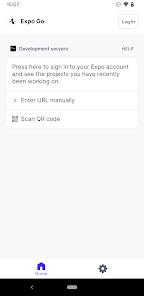
Expo Go is a cornerstone utility in the mobile software engineering world, functioning as a sandbox and development client that allows programmers to preview and test React Native applications instantly on physical hardware. Developed by 650 Industries (Expo), the application is designed to remove the traditional barriers to entry for mobile development by utilizing a "Managed Workflow". This workflow handles the complexities of native platform configuration—such as managing Xcode projects for iOS or Gradle scripts for Android—automatically, allowing developers to focus entirely on writing JavaScript or TypeScript code.
The technical prowess of the Expo ecosystem is amplified by Expo Application Services (EAS), a suite of cloud-based tools for building, submitting, and updating applications. A key feature for modern developers is "Over-the-Air" (OTA) updates, which allow for the immediate deployment of bug fixes and feature updates directly to users' devices, bypassing the standard App Store and Google Play review delays for non-native changes. Furthermore, the Expo SDK provides over 100 standardized APIs for accessing native device features—such as biometrics, cameras, background location, and geofencing—ensuring high reliability and cross-platform consistency.
Operationally, Expo Go enables a "Fast Refresh" development cycle. When a developer makes changes to their code on a local machine, the changes are reflected on the mobile device running Expo Go in milliseconds, without requiring a full recompilation or tethered connection. While it was historically seen as a tool for prototyping, the introduction of "Development Builds" and support for the React Native "New Architecture" (Fabric, TurboModules, and JSI) has made the Expo ecosystem suitable for high-performance, large-scale production applications used by companies like Cameo and Twitter Lite.
Pros & Cons
Dramatically reduces setup time by handling all native configuration and build scripts automatically.
"Over-the-Air" (OTA) updates allow developers to push critical fixes and UI changes instantly without waiting for app store approval.
The Expo SDK provides over 100 high-quality, pre-tested APIs for seamless access to device hardware like cameras and sensors.
Enables rapid prototyping through "Fast Refresh," where code changes appear on the physical device in near-real-time.
EAS Build permits developers to create production-ready binaries in the cloud, removing the need for a Mac for iOS builds.
Fully supports the "New Architecture" of React Native, ensuring high-performance UIs and direct JavaScript-to-native communication.
The ecosystem is cross-platform by default, allowing a single codebase to target iOS, Android, and the Web simultaneously.
- ✕
Managed applications typically have a slightly larger binary size due to the inclusion of the entire Expo SDK runtime.
- ✕
The standard Expo Go app cannot run custom native modules; developers must create "Development Builds" for specialized native integration.
- ✕
Some developers have noted that the debugging interface within Expo Go can be inconsistent, occasionally requiring a full app reinstallation to clear cache.
Download
 Get it on Google Play
  Get it on App Store
 FAQs
Is Expo Go only for beginners?
No, while it is user-friendly, its EAS and "Development Build" features are used by major companies for enterprise-scale production apps.
Can I use custom native code with Expo?
Yes, by using "Development Builds" and EAS, you can integrate any custom Swift, Kotlin, or C++ code into your project.
How do Over-the-Air updates work?
OTA updates utilize the Expo library to fetch the latest JavaScript bundle and assets from the cloud when the app is launched.
Does Expo work on the web?
Yes, the Expo SDK is designed to be universal, allowing you to run the same code on iOS, Android, and in standard web browsers.
What is the "slug" property in the configuration?
The slug is a unique, URL-friendly name used by the Expo dashboard to identify your project across different environments.
Hot Reviews
Before switching to Expo, every project felt like a mini-DevOps challenge. The automated store submissions and cloud build services have transformed my team's productivity and focus.
The idea and utility of Expo is a 5/5. Being able to preview an app on any device instantly via a QR code is a "game changer" for client presentations and internal testing.
While the development cycle is fast, the execution can sometimes be buggy. Debug mode has a habit of messing with the app state, occasionally forcing a "reinstall" to get things working again.