
Smart Mirror



Overview
Smart Mirror is a highly streamlined, hardware-focused utility designed to convert the front-facing camera of an Android device into a functional mirror. From an architectural standpoint, standard Android camera interfaces are frequently optimized for capture latency, shutter speed, and high-dynamic-range (HDR) processing. These optimizations can sometimes result in aggressive software-side sharpening or delay-heavy color grading. This application bypasses these captures-oriented algorithms to deliver a real-time, low-latency video feed optimized specifically for continuous live observation.
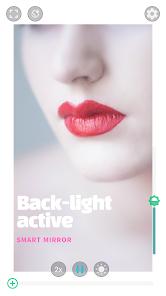
To achieve this low-latency viewport, the application leverages raw frame streams directly from the Android Camera2 API. It renders YUV frame buffers directly to the screen using OpenGL ES fragment shaders, minimizing the typical 50-100ms latency introduced by standard post-processing. A primary challenge with front-facing mobile cameras is their historical limitation in low-light environments. Because front-facing hardware rarely features dedicated LED physical flashes, this software utilizes a "back-light mode". This mode displays a highly luminous, white borders framework around the active video feed, converting the device’s display panel into an ambient key light.
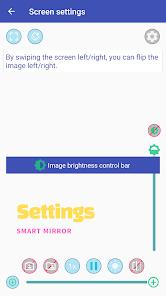
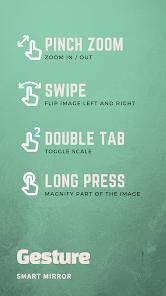
The software further introduces a digital zoom engine that operates independently of native hardware zoom support. This is achieved through real-time bilinear scaling of the viewfinder feed, allowing devices with fixed-focal-length front sensors to achieve magnifying capabilities. The user interface is notable for its customization. The software allows users to edit, rearrange, or completely omit interactive buttons from the active view screen. This clean interface design is useful for both detailed personal grooming and industrial tasks, such as reading serial numbers in hard-to-reach mechanical components. The application also features a "Play / Pause" state. This function locks the frame buffer, allowing the user to freeze the reflection and inspect detailed profiles without needing to save a permanent file to the local storage.
Pros & Cons
Highly Customizable Interface: The settings menu allows users to simplify the interface by completely hiding or displaying specific control buttons based on preference.
Independent Zoom Calibration: The application features integrated scaling algorithms that enable digital magnification even on legacy devices lacking native zoom camera APIs.
Ambient Back-Light Compensation: The integration of a dedicated back-light mode effectively uses screen luminosity to illuminate the user's face in low-light settings.
Versatile Multi-Use Utility: The responsive frame-freezing and zoom capabilities make the application useful for technical and mechanical diagnostics beyond standard beauty needs.
Unobtrusive Ad Footprint: The implementation of advertising banners is restricted to a small top ribbon, preserving screen space for the mirror feed.
- ✕
Absence of Color-Temperature Adjustments: The back-light function is limited to a single white light temperature, lacking warm or cool adjustments for detailed makeup analysis.
- ✕
Capture Resolution Limitations: Saving a frozen image to local storage can result in lower image resolution on some devices due to frame buffer limitations.
- ✕
Persistent Banner Advertising: The free nature of the utility means banner ads remain permanently visible unless internet connectivity is disabled.
Download
 Get it on Google Play
  Get it on App Store
 FAQs
Does the application require an active internet connection to run?
No, the core camera rendering, zooming, and frame-freezing functions run entirely locally on the device's hardware, though ad-loading processes require data access.
Can the user hide all buttons on the screen to get a completely clear view?
Yes, the customizable button settings allow the interface to be simplified, leaving only the primary mirror feed visible.
Where are captured mirror screenshots stored on the device?
When the user triggers a screen capture, the file is saved directly to the device's external storage directory, requiring the appropriate storage permissions.
How does the image flip (left/right) function operate?
The application provides a toggle to switch between a mirrored (flipped) view and a true (unflipped) view, which shows the face as seen by external observers.
Is the digital zoom smooth or stepped?
The application supports both a standard sliding gesture for smooth scaling and preset scale buttons for quick, precise magnification jumps.
Hot Reviews
The application functions effectively as a mobile diagnostic tool for mechanical inspections, allowing users to view real-time feeds of engine components and serial numbers in tight spaces.
The ability to customize the layout by removing unused buttons from the viewport provides a cleaner, more personalized user experience.
The screen-based backlight feature provides consistent illumination in dark environments, making the mirror usable where native cameras fail.
While the live viewfinder is sharp and clear, saving a frozen frame can result in a lower-resolution capture on certain older device models.