Desygner: Graphic Design Maker

Overview
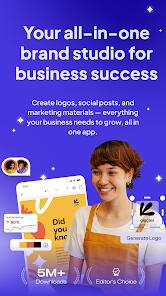
Desygner, developed by Desygner Pty Ltd, is an advanced, cloud-native graphic design and digital publishing platform designed to simplify content creation for small businesses, marketers, and freelancers. Highlighted as a Google Editors' Choice and trusted by over thirty-three million users globally, the platform offers a powerful yet highly accessible alternative to traditional design suites.
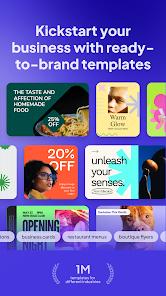
The application relies on an intuitive drag-and-drop editing engine that allows users to create professional-grade marketing materials without requiring formal graphic design training. It features an extensive library containing thousands of customizable templates and millions of royalty-free stock resources, including high-resolution photography, fonts, vector shapes, and pre-designed icons. Desygner's technical pipeline includes a robust, native PDF Editor. This editor allows users to upload, deconstruct, and completely edit complex PDF documents directly on mobile devices, overcoming a common limitation of competitive design apps.
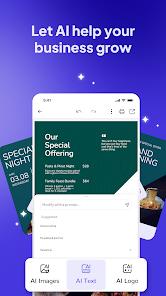
Desygner also integrates advanced generative artificial intelligence utilities, such as a ChatGPT-powered text writer that produces compelling ad copy, and an AI Image Creator for on-demand graphic generation. The application includes a "One-Click Resize" tool that automatically reformats a single design into dimensions optimized for multiple social networks (such as Instagram, LinkedIn, and Facebook) simultaneously.
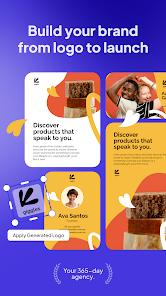
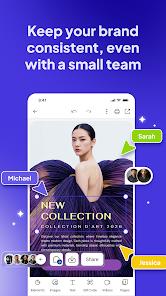
To support brand consistency, Desygner features a centralized Brand Kit. This kit allows businesses to upload custom fonts, establish consistent color palettes, and store official logos. It also includes element-locking mechanisms to prevent non-designers from altering key brand assets during collaboration. Desygner provides seamless real-time cloud synchronization between mobile, tablet, and web browsers, as well as an integrated Social Media Scheduler to design, edit, and schedule marketing campaigns directly from the canvas. It supports up to 5 team members free on Pro+ subscriptions.
Pros & Cons
Native High-Fidelity PDF Editing: Allows users to import, deconstruct, and modify existing PDF documents directly on mobile devices.
Massive Royalty-Free Asset Integration: Grants unlimited access to millions of stock photos, fonts, and professional templates, reducing external sourcing costs.
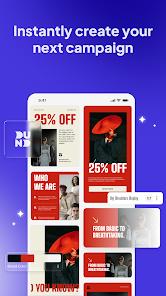
Automated Layout Resizing: The one-click automated resizing engine instantly adapts designs to fit various social platforms, saving time.
Robust Multi-Tenant Collaboration: The Pro+ plan allows users to invite five team members to collaborate and edit designs in real-time at no extra cost.
Enterprise-Grade Brand Management: Centralizes logos, fonts, and colors, and lets designers lock specific template layers to maintain brand guidelines.
- ✕
Prohibitive Pricing for Students: The subscription costs for premium templates, advanced brand portals, and automated resizing can be steep for students and solopreneurs.
- ✕
Mobile-Scaling Constraints: Editing small text layers or fine details on smaller phone screens can be difficult, sometimes leading to unresponsive touch controls.
- ✕
Aggressive Monetization Layout: The free version is highly restricted, with a large portion of the template library locked behind premium subscription popups.
- ✕
Heavy Cloud Network Dependency: The interface can experience latency or slow load times under unstable or slow internet connections.
Download
 Get it on Google Play
  Get it on App Store
 FAQs
What marketing formats can I design and export using Desygner?
Desygner supports a wide array of formats, including social media posts, advertising banners, flyers, business cards, price lists, menus, presentation slides, and printed book covers. Files can be downloaded in high-resolution JPG, PNG, and PDF formats.
How does Desygner’s collaborative workflow benefit teams?
The application supports real-time editing and commenting among multiple users. Pro+ users can invite up to five team members to co-create for free. Additionally, administrators can set group permissions and lock specific template elements to maintain brand guidelines.
Can I schedule social media posts directly from the application?
Yes. Desygner features an integrated Social Media Scheduler. Users can design their visuals, format them using the resizing tools, write copy, and schedule posts to platforms like Facebook, Instagram, and LinkedIn without leaving the app.
How does the PDF editing feature operate on mobile?
Unlike traditional viewers, Desygner's native PDF editor uses advanced algorithms to break imported PDFs into editable vector shapes, text blocks, and image layers, allowing users to modify text and replace images seamlessly.
Is there an offline mode available for Desygner on mobile devices?
Yes. Desygner support includes offline editing on mobile devices, enabling users to continue working on active projects even without a stable internet connection, with changes syncing once connectivity is restored.
Hot Reviews
It has become an indispensable tool. The templates are beautifully curated and easy to edit, the drag-and-drop interface is fast, and the real-time cloud sync across mobile and desktop makes design coordination painless.
The template variety is unmatched and highly professional. However, the premium subscription is slightly expensive for small operators, and the application occasionally lags when loading heavy vector graphics under slow internet connections.
The app's marketing description is somewhat misleading regarding what is actually free. Almost all high-quality layouts are locked, and selecting or resizing small overlapping text layers on a phone screen can be extremely tedious.