Gaming Hub: Game Launcher App

Overview
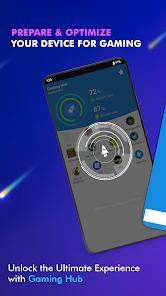
Gaming Hub: Game Launcher App, developed by MC Tech, is a centralization utility designed to optimize the user's interaction with their mobile gaming library. As modern Android devices often host dozens of heterogeneous applications, the "Gaming Hub" acts as a dedicated environment where all gaming-related software is automatically identified, organized, and launched. It is analytically critical to differentiate this app from "game boosters" that modify system kernels; the developer explicitly clarifies that this app is an organization and monitoring tool rather than an FPS-increaser.
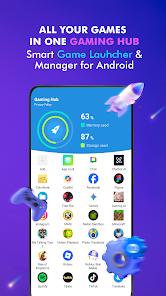
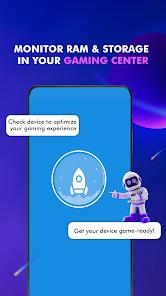
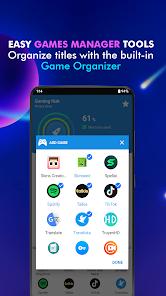
Technically, the Gaming Hub serves as a "Smartphone Gaming Center" that monitors critical system health metrics. It provides real-time tracking of RAM usage and device storage, allowing "pro gamers" to identify when their device is becoming bloated with background processes that could hinder performance. The app features an "Organizer Master" that uses a database of known publishers to automatically categorize newly installed games, while also providing a manual "Add" feature for indie titles or beta builds.
The application has achieved significant global traction, with over 1 million downloads and high rankings in major markets such as the United States, Japan, and Germany. This popularity highlights a gap in the market for users of devices (like Google Pixel or older Motorola phones) that do not include a native manufacturer-level gaming hub. The March 2026 update (version 1.3.3) introduced a more streamlined "Quick Launch" widget and enhanced battery temperature monitoring.
Pros & Cons
Unified Library Management: Automatically detects and aggregates all installed games into a single, clean interface.
System Health Insights: Provides valuable real-time data on RAM usage and available storage to help users optimize their device manually.
High-Speed Accessibility: The "Launcher" feature allows for the immediate starting of games with a single tap, bypassing the app drawer.
Broad Device Compatibility: Operates smoothly on Android versions as old as 5.0 (Lollipop) while supporting current builds.
Clutter Reduction: Facilitates a cleaner home screen by allowing users to launch apps from the hub rather than keeping multiple icons active.
Privacy Conscious: Implements encryption for transit data and offers a clear policy on the lack of personal ID sharing.
- ✕
Not a Direct Performance Booster: Does not overclock hardware or directly increase frame rates within games.
- ✕
Ad-Supported Free Tier: The application includes advertisements that can occasionally disrupt the library management workflow.
- ✕
Subscription Transparency Issues: Some users have noted that specific premium features may require an unexpected subscription fee after a trial.
Download
 Get it on Google Play
  Get it on App Store
 FAQs
Will this app stop my game from lagging?
It provides RAM and storage info to help you optimize your phone, but it is not a direct "lag fixer" or FPS booster.
How does it know which apps are games?
The app uses an internal "Organizer Master" database of popular publishers to automatically identify games, though you can add others manually.
Can I hide games from my home screen?
Yes, the app allows you to organize and launch games from within the hub, which can help in de-cluttering your main system UI.
Does it use a lot of battery?
The app is designed to be lightweight (approx. 13MB) and does not run heavily in the background during actual gameplay.
How do I remove an app from the Hub?
Users can long-press the game icon within the Hub and select the "X" or "Remove" button to take it out of the library.
Hot Reviews
Gamers with large libraries have found the app perfect for keeping their games separate from their "work" apps, praising the clean design.
A subset of critical reviews mentions that they expected the app to "boost" their FPS, noting that the app's branding could be clearer about its role as an organizer.
Several users have noted that the RAM usage tracker helped them realize they needed to close their browser before playing heavy 3D games.